
Indie Author Academy / Resources
KDP and IngramSpark print specs: spine, margins and bleed
Amazon KDP and IngramSpark print specs in one guide: trim sizes, spine width formulas, minimum gutter margins, bleed rules and 300 DPI cover sizing.
Every print-on-demand upload fails for one of four mechanical reasons: the wrong trim size, an inaccurate spine width, margins that crowd the gutter or an omitted outer bleed. Checking the exact Amazon KDP and IngramSpark print specs before you typeset saves hours of re-exporting and avoids paid revision fees.
This reference puts the current Amazon KDP and IngramSpark paperback specifications side by side as of November 2026, drawn from the Amazon KDP paperback formatting guidelines, the Amazon KDP cover specification page and the IngramSpark File Creation Guide. If you want your own numbers calculated immediately, you can plug your trim size and page count into our free book spine width and KDP cover calculator or book margin and bleed calculator.
How trim sizes compare across KDP and IngramSpark
Your trim size is the physical width and height of the finished book after the printer trims the edges. Choosing a standard trim size supported by both Amazon KDP and IngramSpark trim size listings lets you distribute one shared interior file to Amazon, bookshops and libraries without maintaining two separate layouts.
In practice, four trim sizes cover almost every trade fiction and non-fiction release in the UK and US markets. Larger trims fit more words per page, which lowers your page count and reduces per-unit print cost. Smaller trims feel familiar to novel readers and sit cleanly beside traditionally published paperbacks on bookshop tables.
| Trim size (inches) | Metric size (mm) | Common use | KDP & IngramSpark |
|---|---|---|---|
| 5 x 8 in | 127 x 203 mm | Short fiction, novellas, cosy mysteries | Supported by both |
| 5.06 x 7.81 in | 129 x 198 mm | UK B-format trade paperback fiction | Supported by both |
| 5.25 x 8 in | 133 x 203 mm | Standard US genre fiction | Supported by both |
| 5.5 x 8.5 in | 140 x 216 mm | General fiction, memoir, narrative non-fiction | Supported by both |
| 6 x 9 in | 152 x 229 mm | Non-fiction, business, long fantasy and sci-fi | Supported by both |
| 6.14 x 9.21 in | 156 x 234 mm | UK Royal trade non-fiction | Supported by both |
| 8.5 x 11 in | 216 x 279 mm | Workbooks, manuals, illustrated guides | Supported by both |
Before locking your trim size, estimate your finished page count from your word count so the book neither looks overly thin nor balloons past comfortable binding limits. You can check the rough page range for each trim in our word count to page count calculator, and review how page count feeds into retail pricing in Amazon KDP royalties explained.
How paperback spine width is calculated
Paperback spine width depends on two numbers: your final interior page count (including blank pages, title pages and back matter) and the paper thickness, called caliper, used by the printer. Because cream paper is bulkier than white paper, a 300-page novel printed on cream stock has a noticeably wider spine than the same 300-page file printed on white stock.
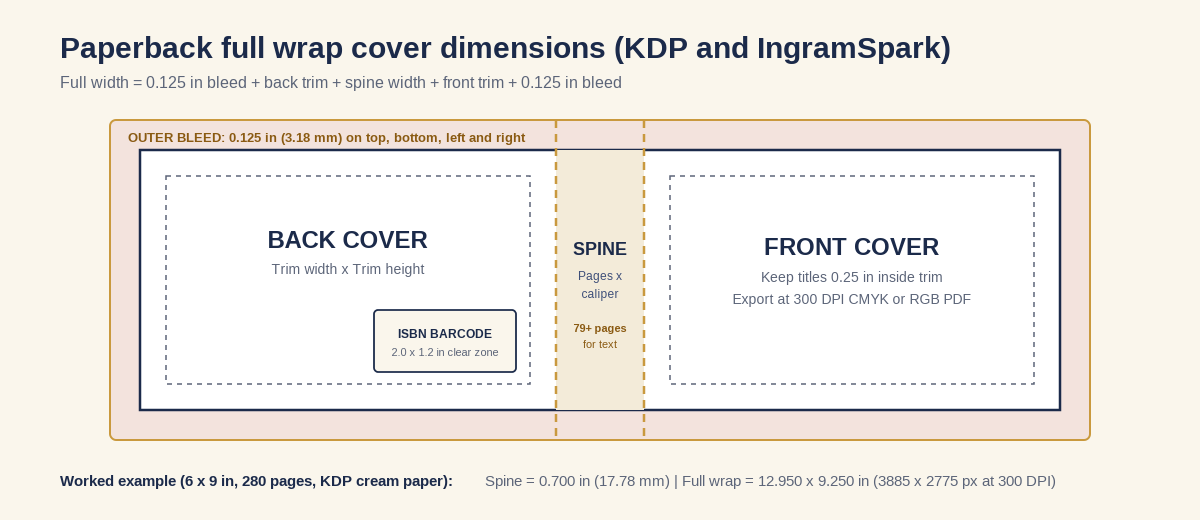
Multiply your exact interior page count by the published per-page paper thickness from the table below to find your spine width. Always work from the final exported PDF page count rather than a word-processor estimate.
| Printer and paper stock | Thickness per page (in) | Thickness per page (mm) | Worked 280-page spine |
|---|---|---|---|
| KDP White paper (black and white) | 0.002252 in | 0.0572 mm | 0.631 in (16.02 mm) |
| KDP Cream paper (black and white) | 0.002500 in | 0.0635 mm | 0.700 in (17.78 mm) |
| KDP Standard colour paper | 0.002252 in | 0.0572 mm | 0.631 in (16.02 mm) |
| KDP Premium colour paper | 0.002347 in | 0.0596 mm | 0.657 in (16.69 mm) |
| IngramSpark 50lb White | 0.002252 in | 0.0572 mm | 0.631 in (16.02 mm) |
| IngramSpark 50lb Cream | 0.002500 in | 0.0635 mm | 0.700 in (17.78 mm) |
| IngramSpark 70lb Colour | 0.002347 in | 0.0596 mm | 0.657 in (16.69 mm) |
Keep two spine lettering rules in mind before sending dimensions to your designer. First, Amazon KDP requires at least 79 pages before you can place any text on the spine. Second, both printers allow up to 0.0625 inches (1.6 mm) of manufacturing variance on each side of the spine folds, so spine lettering must stay at least 0.0625 inches inside both spine edges. If your book sits near 80 to 100 pages, choose a compact, clean typeface rather than tall stretched capitals.
If you want a ready-made visual guide for your cover designer, our free book spine width and cover calculator computes exact millimetres, inches and 300 DPI pixel sizes and downloads a labelled PNG wrap guide straight in your browser. For full designer brief checklists and typical design fees, see book cover design: brief, cost and specs for authors.
Full wrap cover formula and bleed rules
A paperback cover PDF is a single flat spread containing the back cover on the left, the spine in the centre and the front cover on the right. Every outer edge of that spread must include 0.125 inches (3.175 mm) of bleed so background colour and artwork extend cleanly past the guillotine trim line without leaving white slivers.
The exact full-wrap dimensions follow two simple formulas:
- Full wrap width: 0.125 in (left bleed) + trim width (back) + spine width + trim width (front) + 0.125 in (right bleed).
- Full wrap height: 0.125 in (top bleed) + trim height + 0.125 in (bottom bleed).
Take a worked example for a 6 x 9 inch paperback with 280 pages on KDP cream paper. The spine is 280 x 0.0025 = 0.700 inches (17.78 mm). Full wrap width is 0.125 + 6 + 0.700 + 6 + 0.125 = 12.950 inches (328.93 mm). Full wrap height is 0.125 + 9 + 0.125 = 9.250 inches (234.95 mm). At 300 DPI, the exact canvas size is 3,885 x 2,775 pixels.
Leave a clear zone on the lower right of the back cover for the ISBN barcode. Amazon KDP reserves a 2.0 x 1.2 inch rectangle positioned 0.25 inches from the spine edge and 0.25 inches from the bottom trim line. Keep back-cover blurb text, author photos and logos well clear of that corner so neither KDP nor IngramSpark stamps a barcode over your copy.
Interior gutter margins and comfortable reading space
The inside margin, called the gutter, is the space closest to the glued spine. As a paperback grows thicker, more of each page curves into the binding, which forces Amazon KDP to step up its mandatory minimum gutter at 151, 301, 501 and 701 pages.
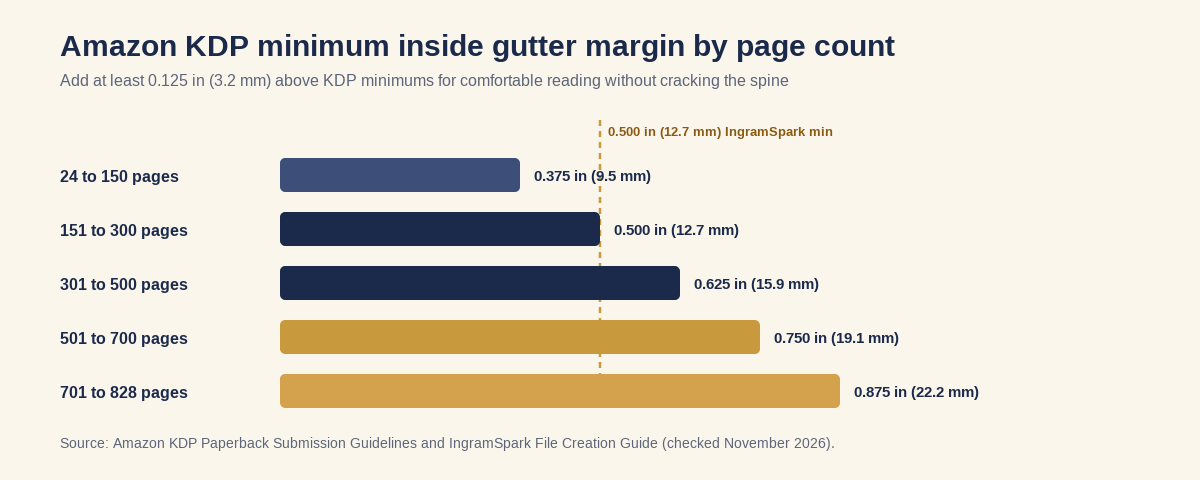
Treat KDP's minimums strictly as rejection thresholds, never as typography targets. A 290-page novel set to the bare 0.500 inch gutter feels cramped in the reader's hand and invites cracked spines. Adding 0.125 to 0.25 inches above KDP's minimum produces a book that reads like a traditional bookshop edition.
| Interior page count | KDP minimum gutter | Recommended gutter | Outside / top / bottom (no bleed) |
|---|---|---|---|
| 24 to 150 pages | 0.375 in (9.5 mm) | 0.55 to 0.65 in (14 to 16.5 mm) | 0.50 to 0.65 in (KDP min 0.25 in) |
| 151 to 300 pages | 0.500 in (12.7 mm) | 0.65 to 0.75 in (16.5 to 19 mm) | 0.50 to 0.65 in (KDP min 0.25 in) |
| 301 to 500 pages | 0.625 in (15.9 mm) | 0.75 to 0.85 in (19 to 21.5 mm) | 0.55 to 0.70 in (KDP min 0.25 in) |
| 501 to 700 pages | 0.750 in (19.1 mm) | 0.88 to 0.95 in (22.2 to 24 mm) | 0.60 to 0.75 in (KDP min 0.25 in) |
| 701 to 828 pages | 0.875 in (22.2 mm) | 1.00 in (25.4 mm) | 0.60 to 0.75 in (KDP min 0.25 in) |
Notice why IngramSpark's 0.500 inch (12.7 mm) safe-margin rule makes dual publishing straightforward. If you set your top, bottom and outside margins to at least 0.55 inches and follow the recommended gutter column above, a single interior PDF clears both KDP and IngramSpark without touching the margins twice.
Interior bleed: when to switch it on and when to leave it off
Interior bleed applies only when an image, shaded box, decorative chapter banner or full-page illustration touches the trimmed edge of the page. Standard text novels, memoirs and plain non-fiction books almost never need interior bleed, and leaving it switched off avoids unnecessary rejection messages.
When your interior does use bleed, your PDF page dimensions must grow on the three outer edges (never on the inside gutter edge):
- PDF page width with bleed: trim width + 0.125 inches (3.18 mm). A 6 x 9 inch bleed interior exports at 6.125 inches wide.
- PDF page height with bleed: trim height + 0.250 inches (6.35 mm), representing 0.125 inches on the top and 0.125 inches on the bottom. A 6 x 9 inch bleed interior exports at 9.250 inches tall.
- Minimum text margin with bleed: KDP raises the minimum outside, top and bottom text margin from 0.250 inches to 0.375 inches so no live text or page numbers drift into the trim path.
One frequent snag with bleed interiors is a faint decorative ornament or oversized whitespace bounding box around a chapter graphic that extends into the outside margin even though the visible ink looks safe. Checking every page in KDP's online Print Previewer catches those bounding-box overflows immediately. For a full walkthrough of formatting software and common layout mistakes, read book formatting software, tools and mistakes compared.
File export checklist before you upload
Running through six final technical checks before uploading prevents almost every automated pre-flight error on both Amazon KDP and IngramSpark:
- Embed every font: Export your interior and cover PDFs with all fonts fully embedded so headings and special characters never substitute on the press.
- Flatten transparencies: Shadows, glow effects and semi-transparent PNG overlays often render as solid dark boxes on print-on-demand presses. Export to PDF/X-1a:2001 for IngramSpark and flattened press-quality PDF for KDP.
- Verify 300 DPI resolution: Confirm that cover artwork and interior images sit at 300 pixels per inch at their actual printed dimensions, and keep black body text at 100 percent K (pure black) rather than four-colour rich black.
- Check total ink coverage for IngramSpark: IngramSpark caps combined CMYK ink density at 240 percent on covers and interiors; heavily saturated dark cover backgrounds should be checked in Photoshop or Affinity before export.
- Order a physical proof copy: Screen previewers never reveal tight gutters, faint body type or overly dark matte covers the way holding a printed copy does. Build proof shipping time into your steps to self-publishing in order and 12-week book launch timeline.
- Match your ISBN across cover and copyright page: Double-check that the ISBN on your copyright page matches the barcode on your back cover and your printer metadata, as explained in ISBNs for self-published authors in the UK and US.
Once your print editions are approved and live, you can list your paperback alongside your ebook on your own site and sell signed copies direct to readers. The Indie Author Toolchest builds your author page, retailer links and direct paperback and ebook storefront from one ASIN or ISBN, with your shipping rates and stock count managed in one dashboard.
Questions, answered
Can I use the exact same interior PDF on both Amazon KDP and IngramSpark?
Usually yes, provided you build one shared PDF around the stricter rule of each printer. Use a trim size supported by both printers, set outside margins to at least 0.5 inches (12.7 mm), and set your inside gutter at least 0.125 inches wider than the Amazon KDP minimum for your page count.
Why does IngramSpark reject cover files that passed on Amazon KDP?
IngramSpark checks colour ink density (keeping total CMYK ink below 240 percent), embedded fonts, PDF/X-1a compliance and slight differences in spine caliper or barcode placement. A quick pre-upload check of ink limits and trim dimensions avoids most title processing errors.
What is the minimum page count for text on a KDP paperback spine?
Amazon KDP requires at least 79 interior pages before allowing text on a paperback spine. Below 79 pages, leave the spine blank so normal binding tolerance of up to 0.0625 inches does not shift letters onto the front or back cover.
Should my print cover file be 300 DPI?
Yes. Both Amazon KDP and IngramSpark specify 300 pixels per inch (DPI) at full final print size for cover artwork and interior photographs. Upscaling a low-resolution ebook cover to print dimensions leaves visible blur on physical copies.
How do I know my exact page count before ordering a paperback cover?
Finalise and typeset your interior manuscript before commissioning the full paperback wrap. A change of even twenty pages alters your spine width by over a millimetre, which forces your cover designer to rebuild the spine and back cover layout.