
Indie Author Academy / Lessons
Series pricing: free first book, box sets and bundles
Series pricing for indie authors: when a free or 99p first book pays, how box sets earn under KDP's 70% band, and a worked read-through example.
Series pricing works best when the first book earns its keep by sending readers to the second, and the later books and the box set earn the money. Most indie authors land on a ladder: book one at 99p or $0.99, or free, books two onwards at a normal price, and a box set that costs less than buying the books one by one. This article works through the numbers on Amazon KDP and the other stores, with the rules checked on 13 November 2026.
The decision comes down to read-through, the share of readers who go from one book to the next. You cannot know yours until you have sold a few thousand copies, so the worked example below uses stated assumptions and shows how the sum changes. For the single-book version of this question, start with our piece on how to price a book.
How should you price a series?
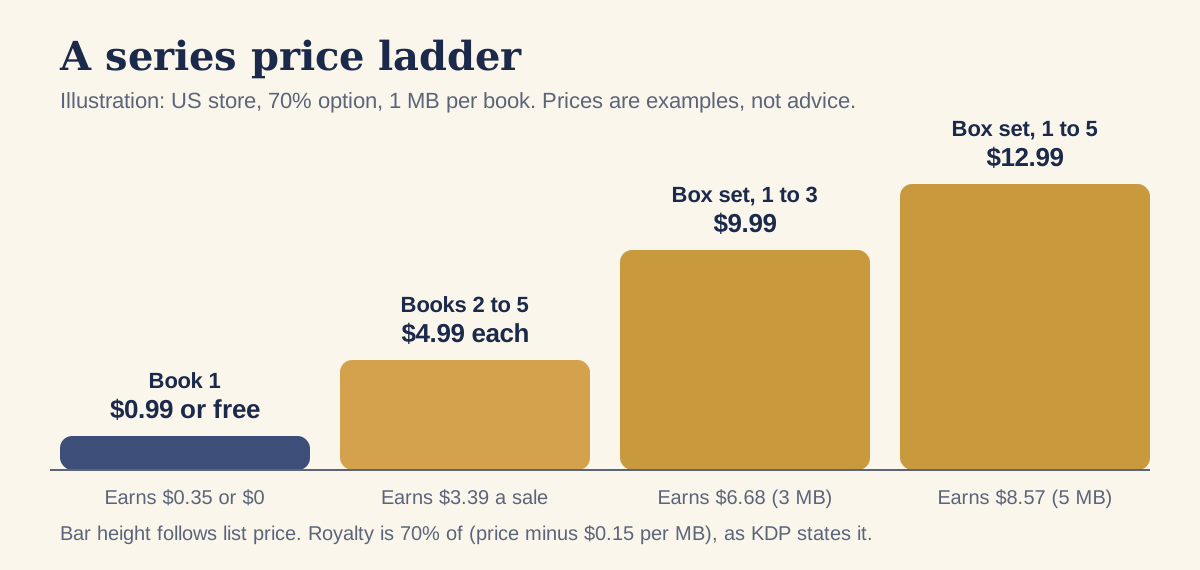
Price each book for the job it does. Book one is the door, so it carries the lowest price or none. Books two onwards are where readers have already decided they like you, so they can carry a normal price for your genre. The box set is a discount for people who arrive late and want everything at once.
The ladder in the picture uses $4.99 for the middle books. That is an example, not a recommendation, because genre norms differ. KDP pays 70% on ebooks priced from $2.99 to $12.99 on Amazon.com, and 35% outside that band, according to the eBook list price requirements page (checked 13 November 2026). The 70% option takes a delivery fee off first, $0.15 per MB in the US store. Our articles on KDP royalties and the wider 70% band cover those rules in full, so they are not repeated here.
The one number worth working out before you set any series price is the royalty on each rung. A $4.99 book of 1 MB earns 70% of ($4.99 minus $0.15), which is $3.39. A book priced at $0.99 sits below the 70% floor, so it earns 35%, which is $0.35. On Amazon.co.uk the 70% floor is £1.77, so a 99p book earns 35% there too.
Should the first book in a series be free, 99p or full price?
There is no price that wins every time, and any source that says otherwise is selling you something. The three options trade different things.
- Free removes every barrier to trying you, and it earns nothing on book one. It makes sense when you have several books behind it, so each new reader has somewhere to go.
- 99p or $0.99 earns a few cents a sale and still feels like an impulse buy. It filters out some readers who would download anything free but never read it.
- Full price earns the most per sale on book one and works best when the book has a strong hook, reviews and a following, or when you sell mainly through ads and a mailing list rather than store browsing.
Two practical points apply to all three. First, a cheap or free first book needs a back-of-book page that sends readers to book two, with a direct link. Without it, the price does nothing. Second, a free book is a list-building tool as well as a sales tool, so an offer inside it (see our ideas for a reader magnet) turns downloads into subscribers you can email when book two is out.
How does permafree work on KDP and wide?
Permafree means a book that is free all the time, not for a promotion. How you get there differs by store, and Amazon is the awkward one.
KDP's own help pages do not describe a way to enter a list price of zero. The list price requirements page shows minimum prices above zero for every option. Its Digital Book Pricing page says that if another sales channel offers your book free, KDP may also make it free, and that your royalty during that period is zero. That is the price-match route: you set the book free at another store, and Amazon may match it. Amazon is not obliged to, and the timing is not in your hands.
The other free option on Amazon is the Free Book Promotion, which belongs to KDP Select. The Free Book Promotions page says you can offer a Kindle ebook free for up to 5 days in each 90-day enrolment period, with no royalties while it runs. Select also asks for ebook exclusivity, so it does not combine with a book sitting free at other stores. Our article on KDP Select or going wide covers that choice.
Free on the other stores
Draft2Digital's FAQ says ebooks can be priced at $0, except at certain stores and libraries. Where a store does not accept free, the book goes out at $0.99, and the FAQ names libraries as unable to list free titles. Draft2Digital also lists Amazon as invite-only among its partners, so check how your own account is set up.
Apple's Apple Books for Authors guide describes a Free Books agreement for accounts that give books away. We could not confirm from that page whether a paid account can set an individual title to free, so check in your Apple Books dashboard. Kobo Writing Life's help article, "How to make your book available for free", says you enter 0 in the pricing section. Kobo's site blocked automated reading when we checked, so confirm the steps in your own dashboard.
What does read-through do to the sums? A worked example
The picture below is an illustration, not a benchmark. No survey we can name and date gives a typical read-through rate, so every percentage here is an assumption you should replace with your own once you have sales data.
Take 1,000 readers who start book one. Assume 20% go on to buy book two, 70% of those buy book three, and 70% of those buy book four. That gives 200, then 140, then 98, or 438 sales of the later books. At $3.39 each, those sales earn $1,484.
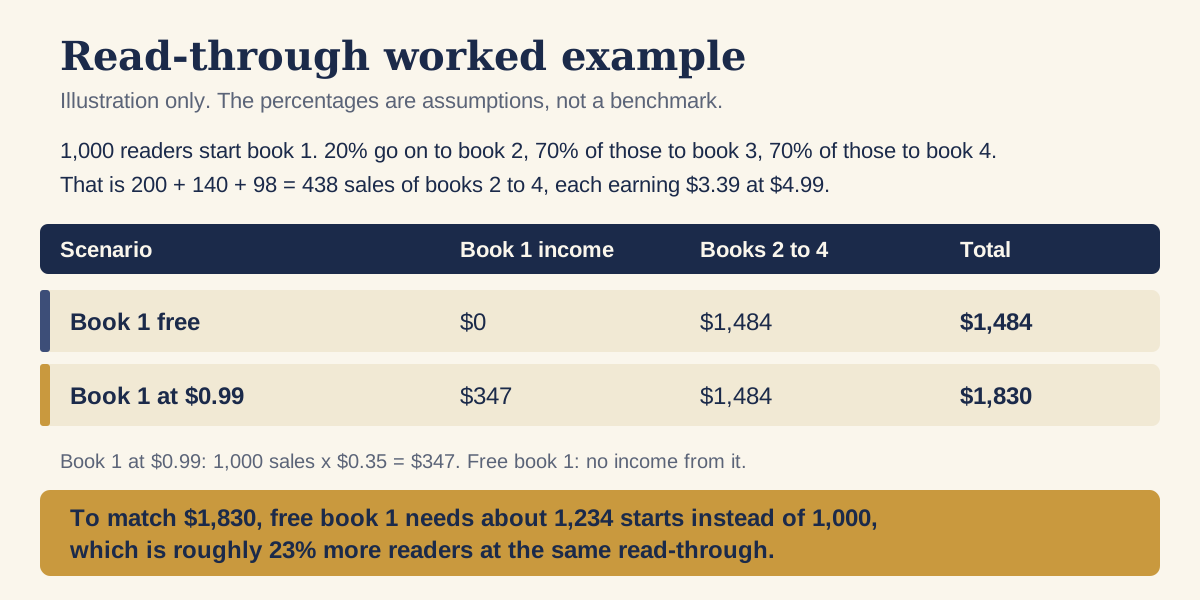
If book one sold at $0.99, the same 1,000 readers add 1,000 times $0.35, or $347, for a total of $1,830. A free book one has to attract about 1,234 starting readers to match that, which is roughly 23% more. The arithmetic does not say free is worse. Free books usually reach many more readers than paid ones, and that is the whole point of the tactic. What it says is how many more.
The same sum tells you what to test. If your read-through is lower than you hoped, a better back-of-book page raises every figure in the chain, while a lower price on book one only raises the first. Change one thing at a time and give each change a few weeks of sales.
How do box sets and bundles earn under the 70% band?
A box set is a big file sold at one price, and that makes the delivery fee and the royalty band matter more than they do for a single book. The picture compares one reader buying three 1 MB books at $4.99 with the same books as a box set. The assumptions are stated in the picture: the combined file is 3 MB, so the delivery fee is $0.45.
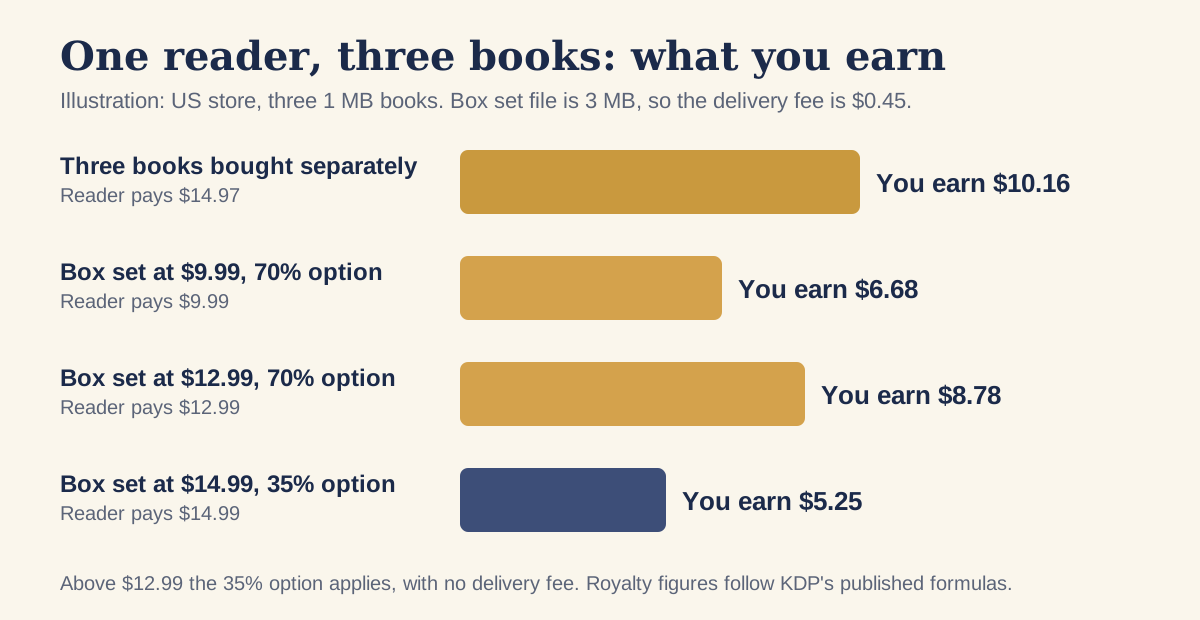
Three separate sales earn $10.16 for a reader who pays $14.97. A box set at $9.99 earns $6.68, and the reader saves about a third. At $12.99, the new top of the 70% band, it earns $8.78 and the reader saves about 13%. Above $12.99 the 35% option applies with no delivery fee, so a $14.99 box earns $5.25, which is less than the $9.99 box on the 70% option.
So the useful price for a three-book box set is at or just under $12.99, unless your reader expects a deeper discount. Before July 2026 the ceiling was $9.99, which is why so many sets clustered there. If you have a box set sitting on the 35% option between $10 and $12.99, the repricing guide shows how to switch it.
One more rule can cap the price. KDP requires the ebook price to be at least 20% below the list price of a print edition of the same book, if one exists. A box set sold only as an ebook is not affected, but a print omnibus with a modest list price can pull the ebook price down.
What does KDP require of a box set?
KDP publishes separate rules for multi-book ebooks on its Boxed and Bundles Edition Guidelines page (checked 13 November 2026). The page covers ebooks only, and says KDP recommends prioritising individual series titles for ebooks, so a box set adds to your series and does not replace it. Amazon may remove products that do not follow the guidelines. The main requirements are these:
- The title must show it contains multiple books, ideally with a word such as "Boxed edition", "Collection", "Compilation" or "Bundle", and it should state the number of books and the range.
- The opening paragraph of the description must say it is a multi-book boxed or bundle edition, and list every included title separately.
- If the books were published before, the description must disclose it. KDP suggests the wording "These titles have been previously published as standalone books."
- A boxed edition needs its own ISBN, separate from the ISBNs of the single titles. You can use a free KDP ISBN or your own.
- A table of contents listing every title must sit at the start, with a hyperlink to the start of each book.
- The cover has to show that it is a multi-book product, for example by showing all the covers together or stating the number of books.
Samplers and incomplete sets need labelling as such in the title. Check the full page before you upload, because the rules are detailed and a missing table of contents is enough to get a set reviewed or removed.
What about bundling for direct sales?
Bundles are one of the easier things to sell from your own site, because you set the bundle and the price and nobody else's category rules apply. A bundle can also include extras that do not suit Amazon, such as an unreleased short story, and it suits readers who finish book one and want the rest immediately.
The money works differently too. On a direct sale you pay payment-processing fees instead of a retailer share, and you also owe any sales tax or VAT yourself. Our articles on what you keep on a $4.99 ebook sold direct and VAT and sales tax on direct ebook sales set out the arithmetic and the tax position. The Indie Author Toolchest lets you sell two or more of your own books together at one price from your author page, as long as each has an uploaded ebook file.
If you stay in KDP Select, remember the exclusivity terms. Our piece on KDP Select and selling direct explains what you can and cannot sell elsewhere while a book is enrolled.
A series pricing checklist
- Work out the royalty on each rung of the ladder, using the delivery fee for the file size.
- Put a link to the next book in the back matter of every book, before you change any price.
- Choose a price for book one and run it for at least a few weeks before judging it.
- Record how many readers go from book one to book two, so you can replace the assumptions in the worked example with your own figures.
- Price the box set at or under $12.99 if you want the 70% option, and check the print-price rule.
- Follow KDP's boxed edition rules for title, description, table of contents, cover and ISBN.
- If you use a permafree book, set it free on a store that allows it and ask Amazon to price-match, or use a Select free promotion for up to 5 days in a 90-day period.
Prices and store rules change, so date-stamp your own notes and check the KDP help pages before each change.
Questions, answered
Should the first book in a series be free?
It depends on how many books sit behind it and how well your back-of-book page sends readers to book two. Free removes every barrier but earns nothing on book one, so it suits a series with several titles already published. A 99p or $0.99 first book earns a few cents a sale and may filter out readers who never open what they download.
Can I set a Kindle ebook to free on KDP?
KDP's list price page does not show a way to enter a price of zero. Authors either set the book free at another store and ask Amazon to price-match, which KDP says it may do, or use a KDP Select Free Book Promotion for up to 5 days in each 90-day period. Royalties are zero while the book is free.
What price should a box set be on KDP?
At or just under $12.99 if you want the 70% royalty option, as the band runs from $2.99 to $12.99 on Amazon.com as of 13 November 2026. Above $12.99 the 35% option applies. The ebook also has to be at least 20% below the list price of any print edition of that book.
Does a box set need its own ISBN?
KDP's boxed and bundles guidelines say a boxed edition needs its own unique ISBN, separate from the ISBNs of the individual books. You can use a free ISBN from KDP or your own, and it should appear on the copyright page.
How do I work out read-through for my series?
Divide the number of readers who buy book two by the number who got book one in the same period, then repeat for each later book. Use your own sales or page-read reports, and allow a few weeks for readers to finish. The worked example in this article uses assumed percentages and is not a benchmark.
Run it all from one place
Author page, direct sales, reader list, review copies and press kit, built from one ASIN. Free for 14 days, no card.
Start your free trial