
Indie Author Academy / Lessons
Amazon KDP ad keyword research without wasting budget
Learn a repeatable Amazon KDP ad keyword research workflow using low-bid discovery, search term reports, exact-match promotion, and negative keyword pruning.
Effective Amazon KDP ad keyword research does not mean buying giant scraped keyword lists and bidding on every phrase at once. Instead, it relies on a repeatable four-stage loop: gather real shopper queries through low-bid discovery campaigns, export your search term report after attribution settles, promote proven converting phrases into Exact match or ASIN campaigns, and prune non-converters with Negative Exact. As of November 2026, this disciplined workflow remains the most reliable way to find profitable buyers without draining your ad budget.
Most authors waste their first few hundred pounds or dollars by treating keyword research as a one-off spreadsheet chore completed before launch. Guessing what readers type rarely matches what actually converts on Amazon's storefront. By letting modest discovery budgets collect verified search data and moving only converting terms into higher-bid campaigns, you pay for buyer intent rather than speculation.
How Amazon Ads match types shape your ad spend
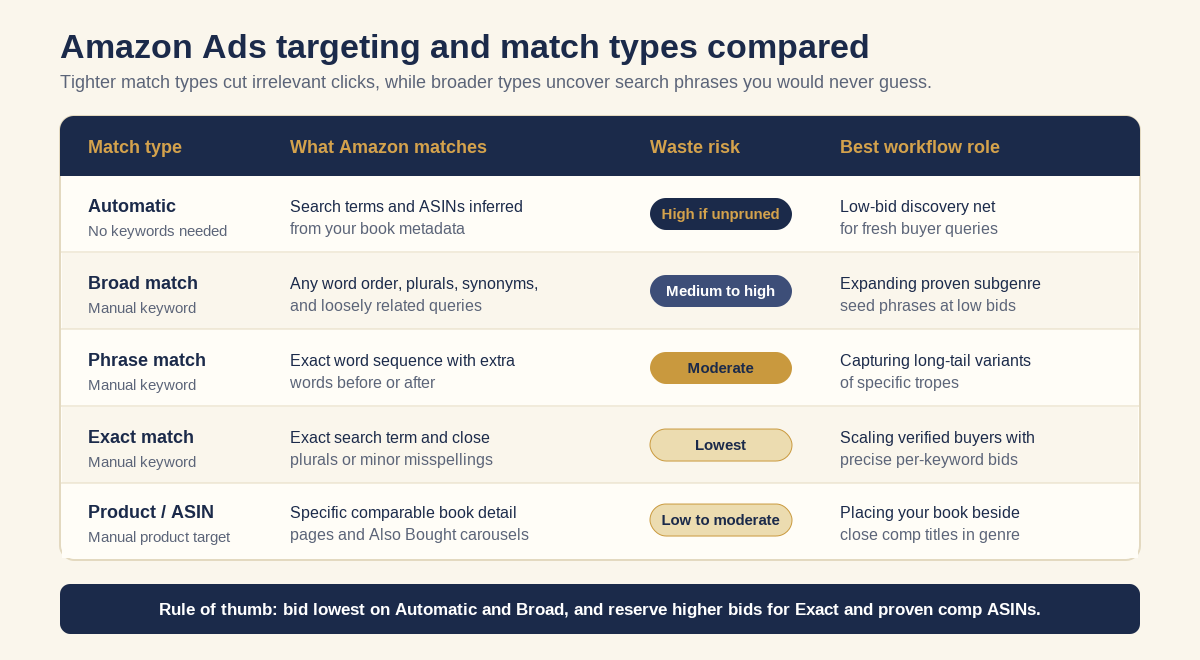
Before selecting a single phrase, understand how the five targeting options in Amazon Ads Sponsored Products spend your daily budget. Each option balances discovery reach against precision, and mixing them blindly inside one campaign makes it impossible to control your cost per click.
Automatic targeting requires no manual keywords at all; Amazon reads your book title, subtitle, categories, and description to match your ad against shopper searches and competitor product pages. Broad match targets your keyword in any word order along with synonyms, plurals, and loosely related phrases. Phrase match requires the shopper's query to contain your exact word sequence, though extra words can appear before or after it. Exact match narrows delivery to your precise phrase plus close plurals or minor misspellings. Product or ASIN targeting places your ad directly on specific comparable book pages and related carousels.
The main budget leak happens when authors place high bids on Automatic or Broad match and leave them unpruned. Broad match on a two-word phrase such as historical mystery can trigger clicks from shoppers looking for non-fiction history textbooks, free public-domain classics, or puzzle games. Keeping discovery match types at low bids while reserving tighter control for Exact match and proven ASINs protects your margin.
Building your seed list from real Amazon storefronts
Every solid Amazon KDP ad keyword research workflow starts on the live Amazon storefront in a private browser window, not inside an expensive third-party scraper. Your goal for day one is a clean seed list of 30 to 50 high-relevance phrases and 20 to 30 comparable book ASINs drawn straight from active reader behaviour.
Follow three simple storefront checks to collect your initial seeds:
- Type your core genre or topic into the Amazon Kindle Store search bar and record the autocomplete suggestions that fit your exact book. Add one letter at a time after your root phrase to uncover specific subgenre modifiers such as cosy mystery set in Cornwall or small town grumpy sunshine romance.
- Open the top 20 paid and free titles in your most accurate subgenre categories and note the authors whose covers, blurbs, and reader reviews closely mirror your book's tone.
- Scroll down to the Customers who bought this item also bought and Products related to this item rows on those book pages to capture 20 to 30 directly competing ASINs, prioritising indie titles with similar pricing and strong recent review activity.
Make sure your own metadata aligns with those same subgenre terms before launching ads, because automatic campaigns read your book's listing closely. Review Amazon KDP Keywords guidelines and our walkthrough on choosing KDP keywords and categories so your storefront listing reinforces what your campaigns target. If your blurb also needs sharpening before sending paid clicks, test stronger hooks using the KDP book description generator.
The four-stage Amazon KDP ad keyword research loop
Once your seed list is ready, divide your advertising structure into two distinct jobs: cheap discovery and controlled scaling. Keeping discovery and proven winners in separate campaigns stops low-intent clicks from starving your best keywords of daily budget.
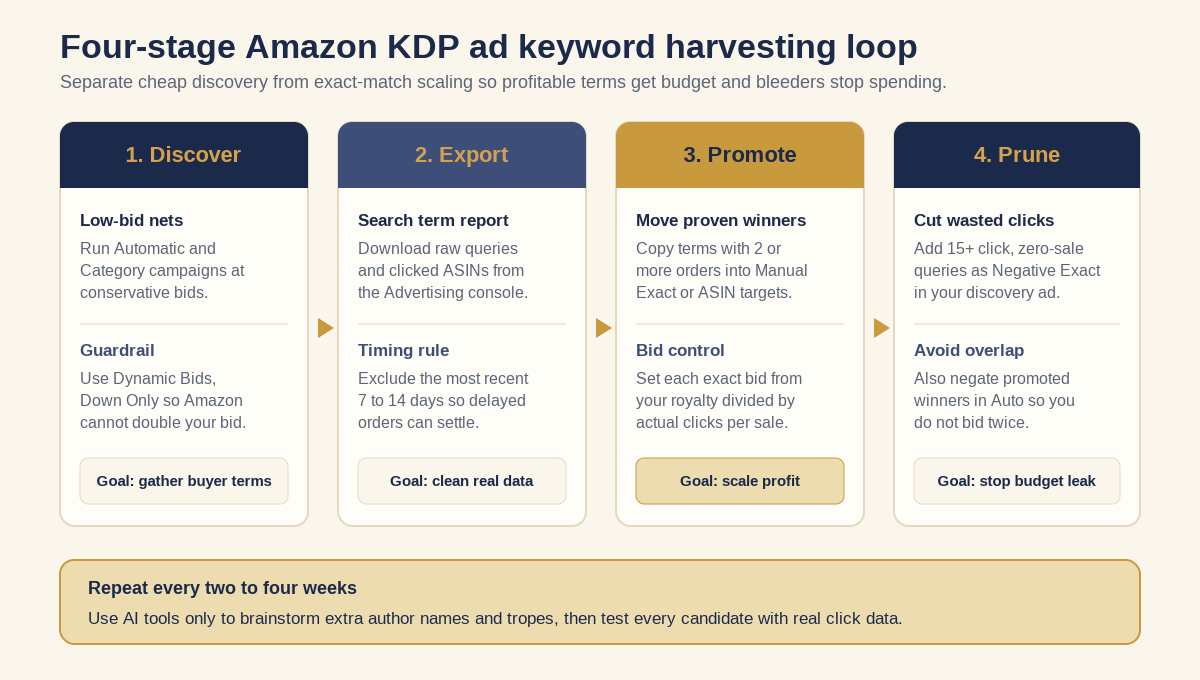
Each stage operates in four clear steps:
- Stage 1 (Discover): Launch one low-bid Automatic campaign and one Category targeting campaign (narrowed to your closest relevant subgenre node), both set to Dynamic Bids, Down Only. If your royalty supports a $0.35 break-even click, start discovery bids cautiously around $0.15 to $0.22 so Amazon explores cheaply. Optionally add one small Manual Broad or Phrase test campaign seeded with 15 to 20 tight phrases from your storefront research.
- Stage 2 (Export): Wait at least three to four weeks, then download the Search Term Report from the Amazon Ads Help Center reporting tab. Filter out the most recent 7 to 14 days because Amazon Ads order attribution lags behind clicks.
- Stage 3 (Promote): Sort the settled data by Orders and KENP read. Any exact shopper query or competitor ASIN that delivered two or more sales (or strong page-read traction) at a cost per acquisition below your royalty ceiling moves into a dedicated Manual Exact or Manual ASIN scaling campaign.
- Stage 4 (Prune): In your original discovery campaign, add every query that racked up 12 to 15+ clicks with zero sales and no Kindle Unlimited lift as a Negative Exact keyword. Also add the winning phrases you just promoted as Negative Exact inside the discovery campaign so you never bid against yourself in two places.
Worked example: how harvesting cuts wasted ad spend
To see why this loop outperforms static keyword lists, consider a worked example for a $4.99 ebook paying roughly $3.40 in net KDP royalty. Suppose you spend $30 in Month 1 on a low-bid Automatic discovery campaign at an average cost per click of $0.25, generating 120 clicks across 28 different search terms and ASINs.
| Month 1 search term group | Clicks | Spend ($0.25 CPC) | Attributed orders | Action taken for Month 2 |
|---|---|---|---|---|
| 2 exact comp-author queries | 18 | $4.50 | 3 orders ($10.20 royalty) | Promote to Manual Exact at $0.35 bid; negate in Auto |
| 1 close comp ASIN | 10 | $2.50 | 2 orders ($6.80 royalty) | Promote to Manual ASIN at $0.35 bid; negate in Auto |
| 4 irrelevant broad terms | 52 | $13.00 | 0 orders ($0.00 royalty) | Add as Negative Exact in Auto immediately |
| 21 low-click test queries | 40 | $10.00 | 1 order ($3.40 royalty) | Leave running in Auto at $0.20 to collect more data |
In Month 1, total spend was $30.00 against 6 orders paying $20.40 in royalty, a net loss of $9.60. Almost half of that budget ($13.00) vanished on four irrelevant terms, while the three winning targets generated 5 orders from 28 clicks ($7.00 spend for $17.00 royalty, a healthy profit). By cutting the four bleeders and isolating the three winners into Exact and ASIN campaigns for Month 2, the exact same $30 budget shifts overwhelmingly into converting traffic. You can model your own royalty ceiling before setting Month 2 bids with the KDP royalty calculator.
Setting promotion and negative keyword rules by the numbers
Avoid making impulsive changes on tiny sample sizes. A keyword with three clicks and zero orders has proved nothing; even a strong 10% conversion rate regularly produces streaks of eight or nine non-buying clicks in a row. Base every promotion and pruning decision on clear arithmetic tied to your book's margin, as outlined in your first £100 or $100 on Amazon Ads.
Use these practical rules across your campaigns:
- Set your maximum Exact bid by dividing your true net royalty (plus verified series read-through if you have sequels) by your historical clicks per sale.
- Require at least two attributed orders before promoting a search term to Exact match, so a single lucky purchase does not fool you into overbidding.
- Wait for 12 to 15 clicks with zero sales before adding a borderline relevant term as Negative Exact, while negating obviously unrelated topics (wrong language, wrong age group, non-book merchandise) on the very first click.
- Prefer Negative Exact over Negative Phrase in almost all cases, because Negative Phrase can inadvertently silence profitable long-tail phrases that happen to share one common word.
If your book is enrolled in Kindle Unlimited, check KENP read figures beside orders before pruning any term. Because Amazon Ads removed estimated KENP royalties from campaign reports as of November 2026, a query showing zero ebook purchases might still be generating thousands of profitable pages read. Review how to calculate KENP royalties after Amazon's reporting change so you never accidentally block your strongest Kindle Unlimited keyword.
Using AI for keyword brainstorming without blind copy-paste
AI chat tools can speed up the brainstorming phase of Amazon KDP ad keyword research when you treat them as idea generators rather than authoritative databases. The danger lies in blind copy-pasting: language models regularly hallucinate plausible author names, invent subgenre labels that shoppers never type, or repeat generic terms like suspense thriller novel that cost far too much per click.
Use a strict three-step filter whenever you brainstorm with AI:
- Give the model your blurb, subgenre, setting, protagonist archetype, and three verified comparable titles, then ask specifically for 20 trope phrases, 15 reader-problem queries (for non-fiction), and 15 mid-list comparable authors published in the last five years.
- Check every single author name and phrase manually in the Amazon Kindle Store search bar. Delete any name that does not exist, any book with fewer than 50 reviews, and any phrase that triggers completely unrelated products.
- Load only the verified survivors into a low-bid Manual Phrase or Product test campaign, then let real Search Term Report data decide which ones earn promotion.
Industry guidance from the ALLi Self-Publishing Advice Center consistently stresses verifying every marketing assumption against live reader response rather than automated shortcuts. Twenty manually verified comparable ASINs outperform five hundred unverified AI-generated keywords every time.
A 30-minute fortnightly maintenance routine
Keyword research works best as a quiet, scheduled habit rather than a frantic daily check. Set a recurring 30-minute appointment every two weeks to maintain your account cleanly:
- Download the previous 60 days of Search Term Reports, excluding the last 14 days so delayed orders and offline Kindle Unlimited reads can settle.
- Filter for search terms with two or more orders and profitable cost per acquisition, then promote them into your Exact or ASIN scaling campaign and add them as Negative Exact in the discovery campaign.
- Filter for terms with 12 to 15+ clicks and zero orders (after confirming low KENP read activity) and add them as Negative Exact in their source campaign.
- Trim bids by $0.03 to $0.05 on Exact targets whose CPC drifted above break-even, and nudge bids up by $0.03 to $0.05 on profitable Exact targets that still have spare daily budget.
- Log total ad spend against total KDP royalties in your master tracker using the framework in tracking book sales and return on investment.
Keep your discovery nets running quietly at conservative bids in the background while your Exact and ASIN campaigns carry the bulk of your spend. Over three to six months, you will own a clean, book-specific library of buyer-verified search terms that requires minimal budget to maintain and travels straight into your next launch in the same genre.
Questions, answered
How many keywords should I put in a new Amazon KDP ad campaign?
Start small with 20 to 50 tightly relevant keywords or comparable book ASINs per campaign rather than dumping 500 unverified terms into one ad group. Smaller sets let your daily budget gather meaningful click data on each target within a few weeks. Once you identify winners from real orders, you can add a fresh batch of candidates in a separate test campaign.
Should indie authors start with Automatic or Manual targeting on Amazon Ads?
Running a low-bid Automatic campaign alongside a focused Manual campaign targeting verified comparable authors and ASINs works best for most books. The Automatic campaign acts as an inexpensive discovery net that uncovers real reader search phrases you might never think of, while your Manual campaign tests close genre peers immediately. Keep discovery bids conservative and use Dynamic Bids, Down Only.
When should I add a keyword as a Negative Exact target?
Wait until a search term accumulates at least 12 to 15 clicks outside the most recent 14-day attribution window with zero attributed sales and no corresponding rise in Kindle Unlimited page reads. You should also add any clearly irrelevant query, such as a wrong genre or textbook term, as Negative Exact immediately. Never use Negative Phrase carelessly, because it can accidentally block profitable longer queries.
Can I use AI tools to generate Amazon KDP ad keywords?
Yes, provided you treat AI strictly as a structured brainstorming aid and never paste its raw output straight into an active campaign. Language models frequently invent plausible-sounding author names, outdated titles, or low-volume search terms that readers never type into Amazon. Always check every suggested phrase or author name in Amazon's live storefront search bar before bidding.
Why should I negate a winning keyword in my Automatic campaign after promoting it?
Adding a promoted winning term as Negative Exact inside your original Automatic discovery campaign prevents both campaigns from competing for the same shopper query. Separating discovery from scaling keeps your data clean and ensures your Exact match campaign gets full control over the bid for that proven buyer phrase. Your Automatic campaign can then spend its budget finding fresh terms instead.