
Indie Author Academy / Resources
Why your Amazon KDP ads lose money and how to fix them
Find out why Amazon KDP ads lose money using a five-step checklist covering impressions, CTR, conversion, break-even ACoS, and Kindle Unlimited read-through.
Most Amazon KDP ads lose money for one of five measurable reasons: bids sit higher than your royalty can support, broad or automatic targeting runs unpruned, clicks land on a weak product page, attribution lag hides recent orders, or Kindle Unlimited and series read-through are missing from your dashboard maths. As of November 2026, Amazon Ads also no longer displays estimated KENP royalties inside campaign reports, making manual profit checks essential before you touch any bid.
Rather than guessing which dial to turn, diagnose every struggling campaign in strict funnel order from impressions down to total catalogue profit. Fixing a bidding mistake on a book with an unconvincing blurb wastes another month of spend, while rewriting a blurb when your real issue is an $0.80 default bid solves nothing. Work through the five checks below in sequence, using your own KDP royalty numbers.
Why Amazon KDP ads lose money in five distinct places
Every paid click travels through a chain of five gates before it puts money in your bank account. First, Amazon has to show your ad to shoppers (impressions). Second, shoppers have to notice your cover and click (click-through rate). Third, visitors on your product page have to buy or borrow (conversion rate). Fourth, the price you paid for those clicks must stay below your net royalty (break-even ACoS). Fifth, if you write a series or enrol in Kindle Unlimited, downstream earnings must be reconciled against your ad invoice.
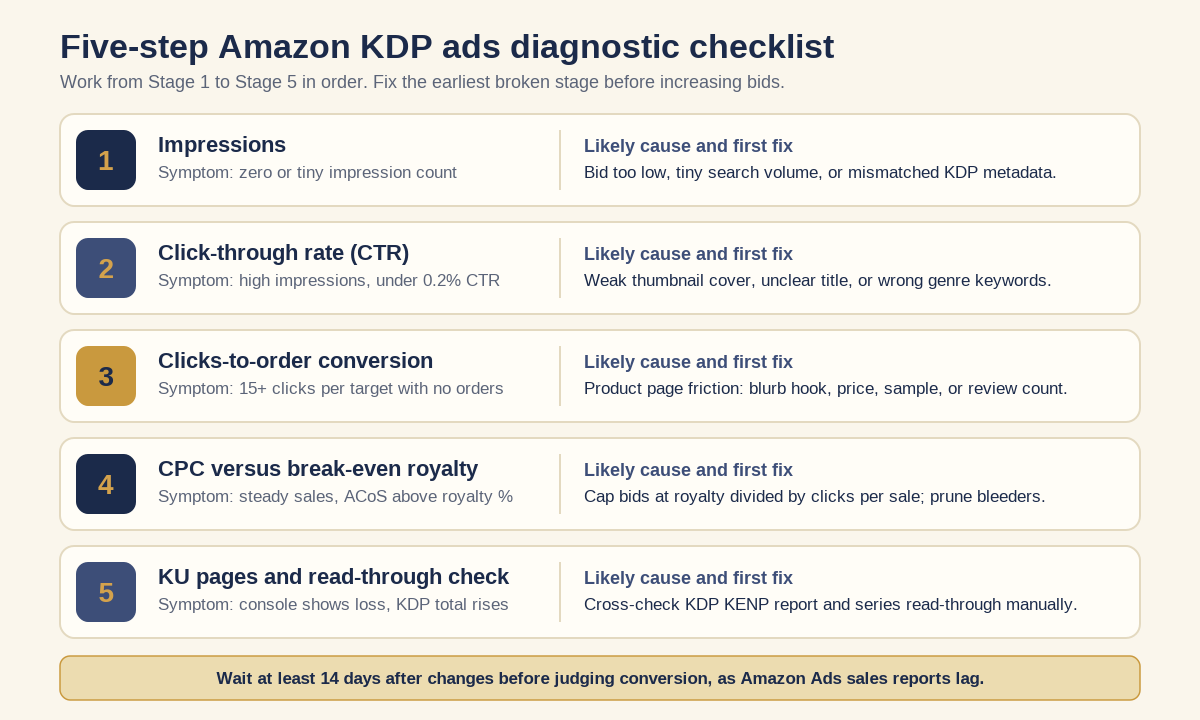
When Amazon KDP ads lose money, the leak always sits at one specific gate. The table below matches the dashboard symptom you see in the Amazon Ads Sponsored Products console to its root cause and first repair step.
| Stage | Metric to check | Warning sign | Primary cause | First repair step |
|---|---|---|---|---|
| 1 | Impressions | Zero or under 500 per week | Bid below auction floor or irrelevant metadata | Raise bid by $0.05 or tighten KDP keywords |
| 2 | Click-through rate | Below 0.2% across 2,000+ impressions | Weak thumbnail cover or mismatched keywords | Audit search terms and test cover clarity |
| 3 | Clicks to order | 15+ clicks with zero sales or borrows | Blurb, price, sample pages, or low reviews | Fix product page before buying more clicks |
| 4 | CPC vs royalty | Steady orders but ACoS exceeds royalty % | High default bids or unpruned broad terms | Cap bids at royalty divided by clicks per sale |
| 5 | Total KDP return | Console shows loss while KDP payout grows | Uncounted KENP pages and series read-through | Reconcile monthly KDP Reports against spend |
Stage 1 and 2: diagnosing low impressions and poor CTR
If a campaign has fewer than a few hundred impressions after seven days, you cannot yet diagnose your book or your blurb because almost nobody has seen the ad. Low impressions usually happen when your bid sits below the going auction price for your genre, or when your KDP book details confuse Amazon's automatic matching engine.
Check your Amazon KDP Book Details fields before raising bids sharply. If your subtitle, categories, and seven backend keyword slots fail to match the subgenre readers search for, automatic campaigns struggle to serve impressions. Our guide on how to choose KDP keywords and categories walks through tightening those signals cleanly.
Once a campaign generates 2,000 or more impressions, inspect click-through rate (CTR), calculated as clicks divided by impressions multiplied by 100. Product detail page placements naturally carry lower CTR than top-of-search slots because shoppers scan dense carousels of covers. Even so, an overall CTR under 0.15% to 0.20% signals a mismatch between who sees the ad and what your cover promises.
Open your search term report before blaming your cover designer. If your cosy mystery appears against general thrillers or self-help queries, your targeting is too loose. When the search terms match your genre yet shoppers still scroll past, shrink your cover to thumbnail width beside the top twenty bestsellers in your category and check title legibility and genre colour cues.
Stage 3: fixing clicks that do not convert into orders
Healthy impressions and steady clicks with zero orders is the most expensive trap in book advertising. Once an individual keyword or product target accumulates 12 to 15 clicks with no orders and no jump in Kindle Unlimited page reads, pause or negate that target and inspect your sales page.
Four elements on your Amazon product page govern conversion rate:
- The opening two lines of your book description, which are the only lines visible above the Read More fold on mobile and desktop screens.
- The retail price compared with comparable books in your exact subgenre and word-count bracket.
- The Look Inside or Read Sample opening pages, where clunky formatting, heavy exposition, or typos lose warm buyers immediately.
- Visible social proof, because a page sitting at zero to three reviews converts far fewer cold ad clicks than a page showing fifteen or more genuine reader reviews.
Check the formatting guidelines in Amazon KDP Book Descriptions so your hook renders cleanly with short paragraphs and bold emphasis where appropriate. If your blurb reads like a plot synopsis instead of a reader pitch, rework it using the frameworks in book blurb templates for indie authors. You can also cross-check broader conversion blockers in why a book is not selling and how long to wait before restarting paid traffic.
Stage 4: break-even ACoS and worked royalty arithmetic
Even when your cover draws clicks and your page converts well, an ad still loses money whenever your cost per acquisition exceeds your net royalty. Amazon Ads reports advertising cost of sales (ACoS) as ad spend divided by gross retail sales multiplied by 100. Because Amazon keeps its retail share before paying you, 100% ACoS is never break-even for an author.
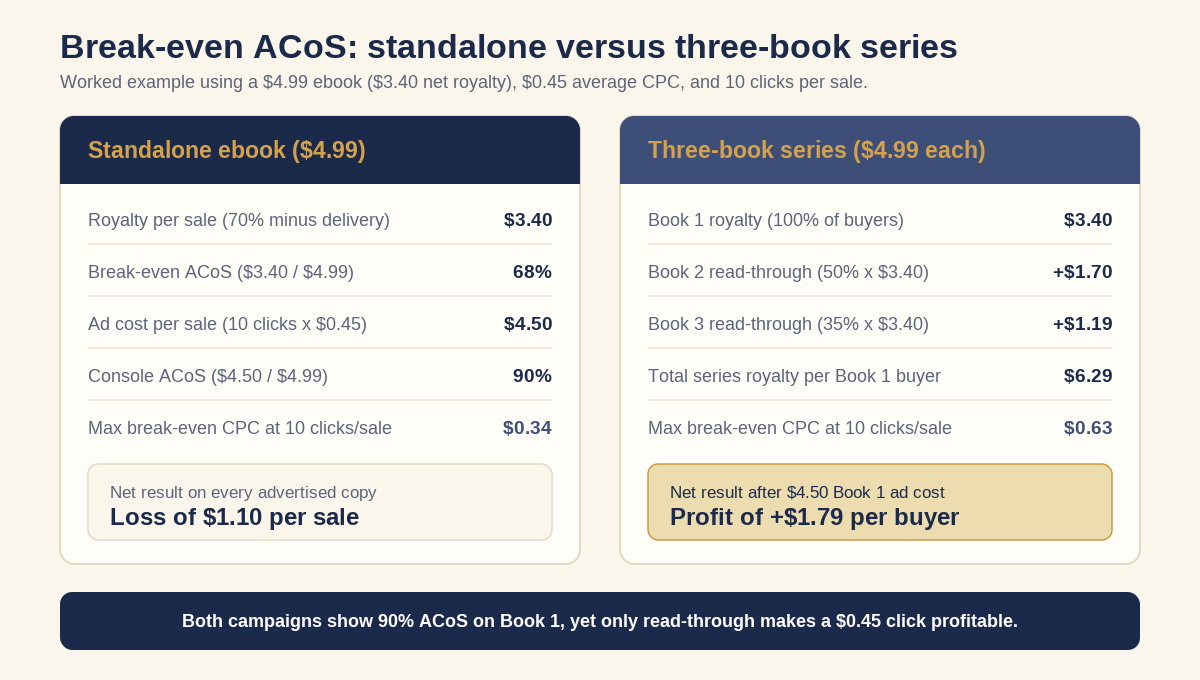
Verify your exact per-copy payout on the Amazon KDP Royalties and Pricing help documentation or model it with our KDP royalty calculator. Consider a worked example for a standalone $4.99 ebook enrolled in the 70% royalty option. After a modest delivery fee, your net royalty sits at roughly $3.40 per copy. Dividing $3.40 by $4.99 gives a break-even ACoS of 68%.
Now trace what happens if you accept a common default bid and average $0.45 per click while converting 1 in 10 clicks into a sale:
- Ten clicks at $0.45 each give an ad cost per sale of $4.50.
- Amazon reports $4.50 of spend against $4.99 of retail sales, displaying an ACoS of 90%.
- Your actual net royalty is $3.40, so subtracting the $4.50 ad cost leaves a net loss of $1.10 on every single copy sold.
- Dividing your $3.40 royalty by 10 clicks per sale reveals your true maximum break-even bid: $0.34 per click.
That arithmetic explains why suggested bids in the console often sink standalone books. A suggested bid reflects what all advertisers in that auction are willing to pay, including multi-book series authors and traditional publishers with deeper margins. If you need a reminder on testing initial click costs safely, revisit what to expect from your first £100 or $100 on Amazon Ads.
Now apply the exact same $0.45 click cost and 10-clicks-per-sale conversion rate to a worked example of a three-book series where every title sells at $4.99 and nets $3.40 royalty. Suppose 50% of Book 1 buyers go on to buy Book 2, and 35% of Book 1 buyers eventually finish the trilogy by purchasing Book 3:
- Book 1 contributes $3.40 in direct royalty for every buyer.
- Book 2 adds 50% of $3.40, which equals $1.70 per Book 1 buyer.
- Book 3 adds 35% of $3.40, which equals $1.19 per Book 1 buyer.
- Total series royalty per acquired reader rises to $6.29, turning that $4.50 acquisition cost into a net profit of $1.79 per buyer and raising your break-even CPC from $0.34 to $0.63.
Stage 5: reconciling Kindle Unlimited read-through and reporting lag
As of November 2026, two reporting realities in the Amazon Ads Help Center regularly trick authors into pausing profitable campaigns. First, ad-attributed sales can take up to 14 days to settle, and clicks can register for 24 hours after pausing. Second, Amazon Ads removed estimated KENP royalties from campaign reporting and replaced them with qualified borrow metrics, which we detailed in Amazon Ads drops estimated KENP royalties: what to do.
To measure real profitability across 30 days, place total Amazon Ads spend beside your full KDP Reports royalty total (ebook, print, and finalised KENP page earnings across the series). Use the Kindle Unlimited royalty calculator to estimate full-book borrow payouts, and log every month using tracking book sales and return on investment. If total royalties rise by more than ad spend across two consecutive months, the campaign is working even when console ACoS looks alarming.
Common campaign settings that quietly drain your budget
Before concluding your book cannot advertise profitably, check four settings that routinely inflate spend:
- Dynamic bidding set to Up and Down instead of Down Only, letting Amazon double your bid on top-of-search slots.
- Automatic or broad campaigns left running for months without adding negative keywords from the search term report.
- Unchecked placement bid adjustments layered on top of already high default bids.
- Mixing different formats or unrelated titles inside one ad group, which blurs your true clicks-per-sale average.
Switch struggling campaigns to Dynamic Bids, Down Only, reset placement modifiers to 0%, and isolate one format per campaign.
The ordered seven-day repair plan for bleeding campaigns
Follow this sequence over seven days to stop losing money without wiping out useful data:
- Day 1: Calculate break-even CPC for each advertised book from real KDP royalty (plus verified read-through) divided by clicks per sale.
- Day 2: Switch every Up and Down campaign to Down Only and clear unproven placement modifiers.
- Day 3: Download 60 days of Search Term Reports, exclude the last 14 days, and list targets with 15+ clicks and zero orders.
- Day 4: Add those non-converting terms as Negative Exact in their source campaigns immediately.
- Day 5: Lower bids on keywords above your break-even CPC in $0.05 to $0.10 steps rather than pausing converters overnight.
- Day 6: If relevant targets still convert worse than 1 sale per 15 to 20 clicks, pause cold ads and fix your blurb, price, or sample pages first.
- Day 7: Reconcile total monthly KDP royalties (including KENP pages and sequel sales) against total ad spend, then repeat every fortnight.
If your genre's going click prices stay above what a standalone KDP royalty can absorb, pause cold Amazon Ads until you publish a sequel or build higher-margin channels. Selling directly from your own site keeps far more of each retail sale than a 70% marketplace royalty, as covered on our sell ebooks direct guide.
If you want an author website, mailing list, and direct checkout in one place, Indie Author Toolchest costs $12.99 a month or $120 a year with a 14-day free trial and no card required, and direct sales switch on when you subscribe. Fix the earliest broken stage in your funnel first, cap every bid at your real royalty maths, and never let an unpruned campaign run past a fortnight unchecked.
Questions, answered
Why do my Amazon KDP ads get clicks with zero sales?
Clicks without sales almost always point to friction on your book product page rather than your targeting alone. When a reader clicks your ad, the cover and title have already done their job, so a failure to buy points to the blurb, the price, the opening sample pages, or a low review count. Pause or lower bids on bleeding targets and audit your product page before buying more traffic.
What is a break-even ACoS for a KDP ebook?
For a single book, your break-even advertising cost of sales equals your net royalty divided by the retail price. On a $4.99 ebook paying roughly $3.40 after KDP delivery fees, break-even ACoS sits at 68%. Any ACoS above that percentage loses money on book one unless series read-through or Kindle Unlimited page reads close the gap.
How long should I wait before changing a losing Amazon Ads campaign?
Wait at least 14 days after launching a campaign or editing bids before making judgement calls on conversion. Amazon Ads sales reports lag behind real clicks, and Kindle Unlimited page reads are no longer estimated in royalties inside the campaign dashboard as of November 2026. Evaluating a campaign after three or four days often leads authors to pause targets that are actually converting.
Why does Amazon Ads show a loss when my KDP royalties are rising?
Amazon Ads removed estimated KENP royalties from campaign reporting, and the dashboard credits only direct purchases within its attribution window. If your book is enrolled in Kindle Unlimited or sits as book one in a multi-book series, significant earnings from page reads and sequel purchases appear in KDP Reports rather than your ad dashboard. Cross-checking total monthly royalties against total ad spend gives the true return.
Should I use Dynamic Bids Up and Down on a new KDP ad campaign?
No, most indie authors lose budget quickly with Up and Down bidding because Amazon can raise your bid by up to 100% for top-of-search placements. Starting with Dynamic Bids, Down Only keeps your maximum cost per click capped at the exact figure your royalty maths supports. Only test placement multipliers once a keyword has already proved profitable.