
Indie Author Academy / Resources
How to turn reader reviews into book marketing posts
How to turn reader reviews into quote graphics, BookTok hooks, email P.S. proof and website praise while staying compliant with Amazon KDP review rules.
To turn reader reviews into book marketing posts that bring in new readers, stop screenshotting long walls of five-star praise and pull single 12-to-18-word sentences that describe a specific feeling, character or trope. You can reuse each strong line across four channels: square quote graphics, short BookTok hooks, email newsletter postscripts and your author website.
Readers trust other readers far faster than they trust an author praising their own book. With a clear spreadsheet and basic compliance habits for Amazon KDP and reviewer attribution, even ten honest reviews supply months of credible social proof without costing a penny.
What rules apply when you quote reader reviews in marketing?
Before designing a single graphic, separate what you may publish on your own channels from what Amazon permits on its own retail pages. As of November 2026, Amazon KDP book description guidelines prohibit placing customer reviews, star ratings or promotional quotes inside the main KDP Book Description box. Putting reader quotes there can trigger a listing warning or suppression. If you want curated praise on your Amazon retail page, place it inside the separate Editorial Reviews section in Amazon Author Central instead.
On your own marketing channels, including your author website, email newsletters, Instagram, Facebook and TikTok, indie authors may quote brief, faithful excerpts from public reader reviews. Follow four sensible rules to stay ethical and respected inside the book community:
- Quote only a short excerpt of one sentence rather than republishing a reviewer's full multi-paragraph essay.
- Keep the wording accurate and never splice separate sentences together to invent praise the reader did not mean.
- Attribute positive quotes simply, using "Verified Amazon reader", "Goodreads reader" or the reviewer's public first name or handle.
- Keep any playful three-star critique completely anonymous, with no username, profile picture or store screenshot that could direct followers towards the reviewer.
Check Amazon KDP customer review guidelines as well so you never offer incentives, gifts or discounts in exchange for a public review. For broader indie ethical standards on review collection and promotion, the Alliance of Independent Authors maintains clear guidance for self-published writers. If you are still gathering your first launch reviews, our guide to running an advance review team shows how to collect honest early feedback cleanly.
How to turn reader reviews into four repeatable post formats
A single well-chosen review does far more work when you match its tone to the right format. Posting identical square graphics everywhere quickly trains followers to scroll straight past them. Instead, sort your incoming reviews into four practical buckets and route each one to the format where it earns attention naturally.
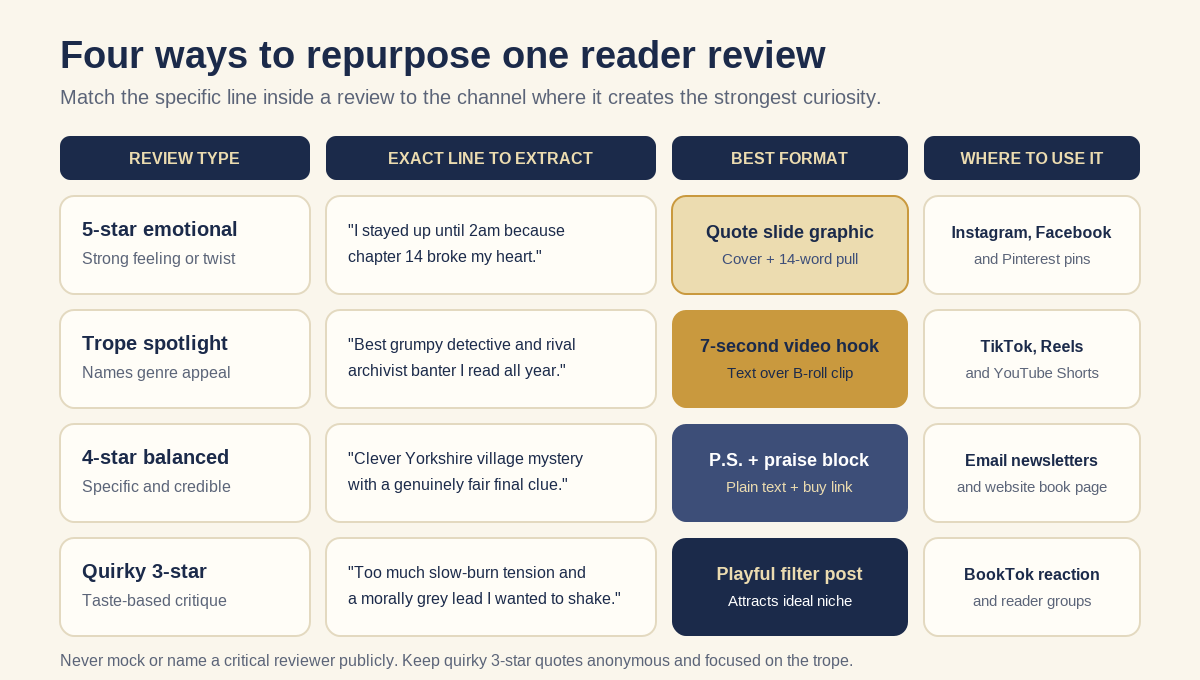
A worked example shows how this plays out using just ten reviews from a debut cosy mystery launch. Suppose out of ten reviews you find three emotional 5-star lines, three trope-specific mentions, two detailed 4-star endorsements and two playful 3-star taste remarks. Across one month, those ten reviews generate twelve distinct marketing touchpoints: four Instagram or Facebook quote slides, four seven-second BookTok text hooks, two email newsletter postscripts and two updated praise quotes on your website book page. None of the posts looks repeated, yet every single one reinforces why readers enjoy the book.
Notice how this fits into a wider zero-spend routine. You can slot review posts straight into two of your weekly marketing slots alongside the free tactics covered in our no-budget book marketing plan.
How to pull the single 15-word line that actually sells
Most authors pick the wrong sentence when reading their own reviews. They highlight polite compliments such as "Great book, well written, loved the characters, five stars!" That sentence makes an author smile, yet it gives a stranger zero reason to click. Generic praise sounds interchangeable across every novel ever published.
Look instead for concrete evidence in four categories: emotional reaction, reading behaviour, specific trope naming or vivid comparison. Compare the weak pull quotes against stronger lines drawn from the same fictional thriller review:
| Weak generic pull quote | Strong specific pull quote | Why the stronger line converts better |
|---|---|---|
| "Really great book, I loved every page." | "I missed my train stop twice because of chapter nine." | Shows physical absorption and hints at an unforgettable twist. |
| "Wonderful writing and lovely characters." | "Two rivals stuck on a windswept lighthouse with one secret too many." | Names the setting, relationship dynamic and tension in twelve words. |
| "Five stars, highly recommend to everyone!" | "A fair-play puzzle where I genuinely gasped at the final letter." | Reassures mystery fans that the ending earns its payoff. |
| "Could not put this down at all." | "Read it in one rainy Sunday with three cups of tea." | Paints an unmistakable mood readers want to recreate for themselves. |
If a long review contains one brilliant ten-word phrase buried inside a 150-word paragraph, lift that exact ten-word clause on its own. You do not need ellipses at the start and end if the phrase stands naturally as a clean fragment, provided it reflects the reviewer's genuine verdict. Your blurb and your pulled review lines should work side by side; our guide to book blurb templates for indie authors explains how to pair a sharp premise with a single punchy endorsement line.
Why quirky three-star reviews often outperform generic five-star praise
Scrolling feeds are packed with identical "5 stars, best book ever!" graphics. Readers skim right past them because every product claims perfection. A playful three-star or four-star remark breaks that visual pattern immediately and acts as an honest filter for your exact target audience.
This tactic works strictly on subjective taste comments, never on genuine production complaints. Never use a review complaining about spelling mistakes, weak editing, formatting bugs or a broken ending. Use only reviews where one reader disliked the exact trope another reader actively hunts for.
Consider these three realistic examples across genres:
- A cosy mystery review saying "Too much baking and village gossip, not enough forensic gore" is pure gold for cosy readers who actively avoid graphic crime.
- A slow-burn romance review saying "They took 280 pages just to admit they liked each other" makes slow-burn fans add the book to their reading pile immediately.
- A literary historical review saying "Quiet, atmospheric and full of rain rather than sword fights" signals the exact tone atmospheric fiction lovers crave.
Frame the post with good humour and zero defensiveness. A clean seven-second TikTok clip showing a steaming mug beside your paperback with on-screen text reading "A 3-star reviewer warned there was 'way too much village gossip and tea' in my Yorkshire mystery... so if that sounds like heaven, chapters 1 to 3 are free in my bio" invites warm comments from exactly the readers who will leave five stars next week. Always keep the reviewer unnamed so nobody tracks them down.
Designing a readable book review graphic without clutter
When turning a quote into a static image for Instagram, Facebook or Pinterest, clarity on a 6-inch phone screen beats decorative flourishes. Cluttered stock backgrounds, curly script fonts and tiny 9-point screenshots make readers scroll away within half a second.
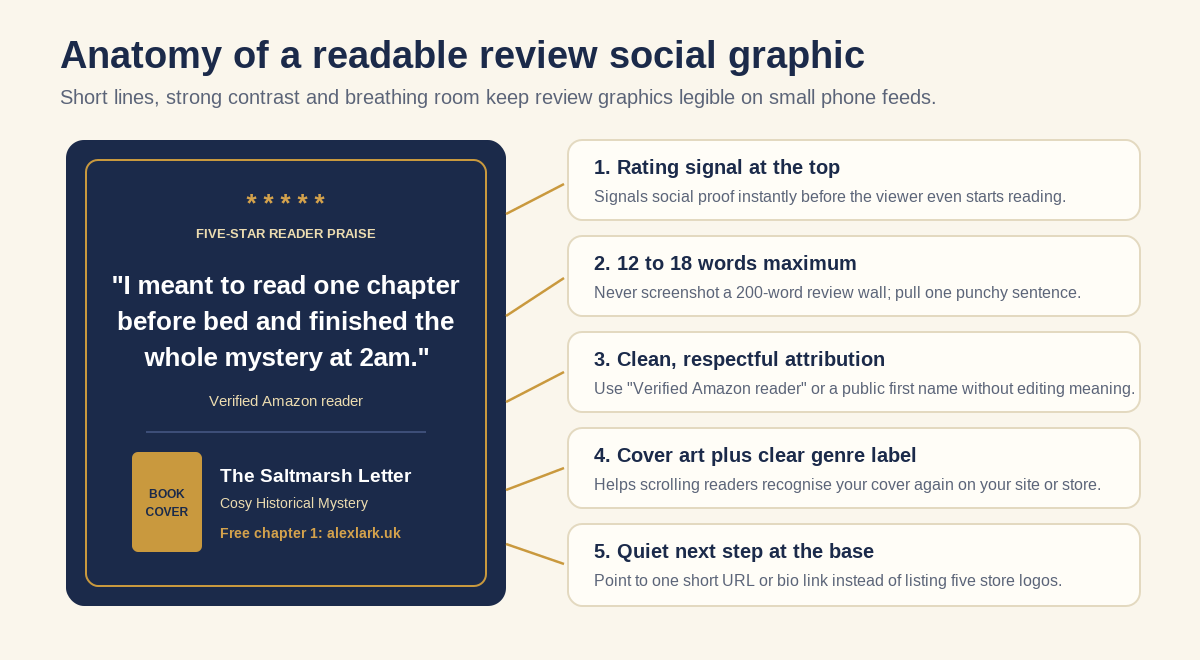
Stick to five simple design rules in Canva or your preferred layout tool so you can produce a fresh graphic in three minutes flat:
- Use a solid dark navy, deep forest or warm cream background drawn from your book cover palette rather than a busy photograph behind text.
- Set the quote in a crisp serif or sans-serif font large enough to read comfortably at thumbnail size, keeping the excerpt between 12 and 18 words.
- Leave generous empty margin around the edges so mobile app interfaces, caption overlays and square grid crops never slice off your words.
- Place a flat or clean upright cover image at the bottom beside your book title and genre label so viewers remember the cover when they see it later.
- Add one calm next step at the base, such as your short landing page URL, rather than crowding the corner with five retailer badges.
Build one master template per book series and lock the font sizes and margins. Whenever a new reader leaves a vivid sentence, duplicate the slide, swap the text and attribution, export and schedule.
Ready-to-use templates for BookTok, email postscripts and website blocks
Having copy-and-paste structures ready stops you staring at a blank caption box. Adapt these three field-tested templates to your own genre and voice.
Template 1: seven-second BookTok or Reels overlay
Film a calm seven-second clip of yourself opening your paperback or pouring tea beside the cover. Place one short block of on-screen text in the upper centre of the frame: "When a reader says: '[insert 12-word trope quote]'... and you wrote this book specifically for people who love [genre/trope]." Keep the caption short: "Thank you to everyone reading [Book Title] this week. Read chapters 1 to 3 free via my bio link."
Template 2: email newsletter postscript
Adding a single review line to the P.S. of an ordinary reader email sells backlist copies quietly without turning your whole letter into a sales pitch. Place this block right below your sign-off: "P.S. If you have not met [Main Character] yet, a reader left this note about [Book Title] on Tuesday: '[Insert 14-word quote].' You can grab the ebook or a signed paperback direct from my shop here."
Template 3: author website praise block
On your own book page, display three short, distinct quotes directly beneath your blurb so hesitant buyers see three different reasons to trust the book: one quote praising pacing, one praising characters and one praising setting or ending. Our dedicated guide on how to show reader reviews on your author website details exact placement and schema tips. If you manage advance copies and reader praise under one roof, Indie Author Toolchest ($12.99 a month or $120 a year, with a 14-day free trial and no card required, and direct sales turned on when you subscribe) includes ARC distribution alongside author pages where you can display hand-picked reader quotes cleanly beside your direct checkout.
Building a simple review bank you can reuse all year
Reviews scatter across Amazon UK, Amazon US, Goodreads, BookBub, StoryGraph and reader replies in your email inbox. Checking six sites every time you need a Tuesday social post wastes half an hour and makes you give up.
Create one simple spreadsheet titled Review Bank with six columns: Book Title, Exact 15-Word Excerpt, Trope or Mood Tag, Attribution, Source Platform and Last Posted Date. Spend ten minutes on the last Friday of each month scanning new reviews and reader emails, copying any vivid sentence into the sheet and tagging it by mood (such as "cosy", "plot twist", "banter" or "3-star playful").
Once you collect twenty strong lines, rotate them every eight to twelve weeks across different backgrounds and video clips. Most followers miss any single social post, and new subscribers join your email list every month who have never seen your older graphics. Keeping a tidy review bank turns reader generosity into a calm, permanent marketing engine.
Questions, answered
Are indie authors allowed to quote Amazon reader reviews on social media?
Authors commonly quote brief excerpts from public reader reviews in social graphics, email newsletters and on their own author website, using simple attribution such as Verified Amazon reader or the reviewer's public first name. Keep the quote accurate without changing its meaning, and avoid pasting full copyrighted reviews.
Can you put customer reviews inside your Amazon KDP book description?
No. As of November 2026, Amazon KDP book description guidelines forbid placing customer reviews or star ratings inside the main KDP description field. Use the Editorial Reviews box inside Amazon Author Central instead if you want to display curated praise on your Amazon product page.
Should you ever turn a three-star review into a marketing post?
Yes, provided the review highlights a genre preference rather than a craft fault such as typos or missing pages. If a three-star reviewer complains that a romance had too much slow-burn tension or a mystery was too cosy, sharing that line anonymously attracts readers who actively love those exact traits.
How long should a review quote be on a social media graphic?
Keep social review quotes to between 12 and 18 words so the text stays legible on a mobile screen without squinting. Pulling one vivid emotional sentence outperforms screenshotting an entire three-paragraph review.
How many reviews do you need before building a review marketing bank?
Even five honest launch or ARC reviews give you enough distinct phrases to build twelve varied posts across a month. Pair each short quote with a different B-roll clip, email postscript or website praise slot rather than repeating the same graphic.