
Indie Author Academy / Lessons
Is Scrivener worth it? An honest verdict by author type
Is Scrivener worth it for authors? An honest verdict by author type, with the November 2026 price, trial terms, platforms and what the alternatives cost.
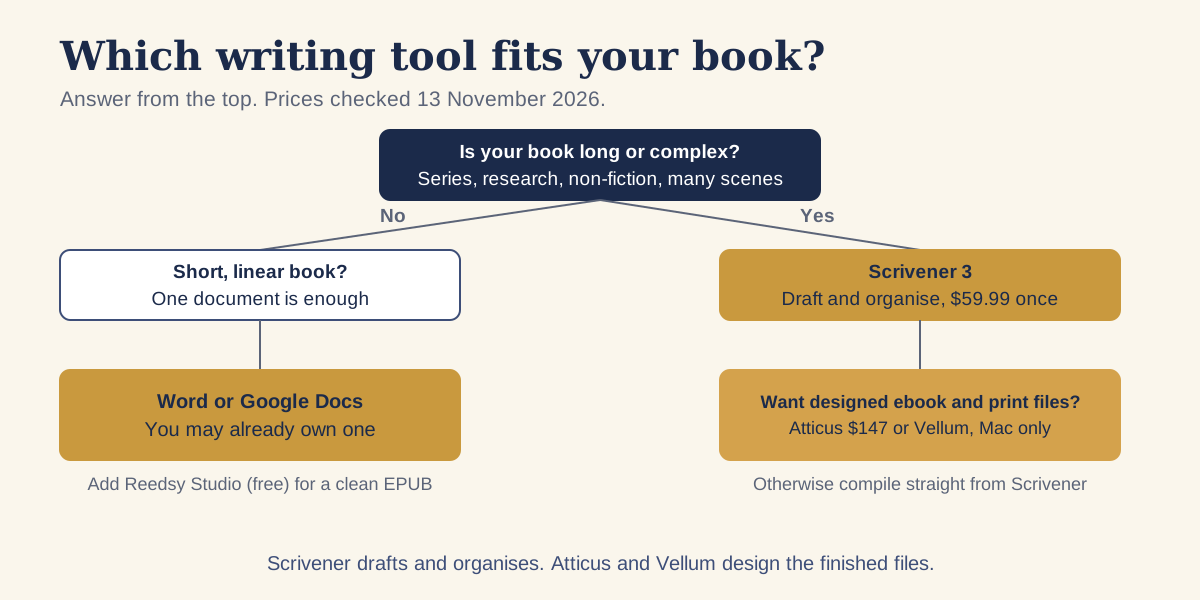
Is Scrivener worth it? Yes if you write long books, keep a lot of research or notes, or like to move scenes around, and it is poor value if your book is short and runs from start to finish. As of 13 November 2026, a Scrivener 3 licence costs $59.99 for macOS or Windows, bought once, and the free trial lasts 30 days of actual use. The answer depends on how you write far more than on the price.
We read Literature & Latte's own pages on 13 November 2026 for the price, licence and trial, and each competitor's own page for theirs. Where a vendor page did not load or did not state a figure, we say so. Prices change, so check the store before you buy.
The short verdict, by type of author
| Author type | Scrivener? | Why |
|---|---|---|
| First novel, one draft, start to finish | Optional | Word or Google Docs does the job, and you may own one already |
| Novelist who writes out of order or restructures | Yes | Each scene is its own document, and you reorder them by dragging |
| Series writer | Yes | One project per book, with character and place notes beside the text |
| Non-fiction author with sources | Yes | PDFs, web pages and images sit in the same project as the draft |
| Author who wants a finished ebook and paperback with no extra software | Maybe | It compiles EPUB and PDF, but the layout options take learning |
| Author who wants designed, polished interiors fast | Draft only | Use a formatting tool such as Atticus or Vellum for the final files |
| Chromebook or Linux user | No | Literature & Latte's download page lists macOS, Windows and iOS only |
The table is our reading of what each tool is built for, not a measurement of results. Writers differ, and the 30-day trial described below is the only fair test.
How much does Scrivener cost in November 2026?
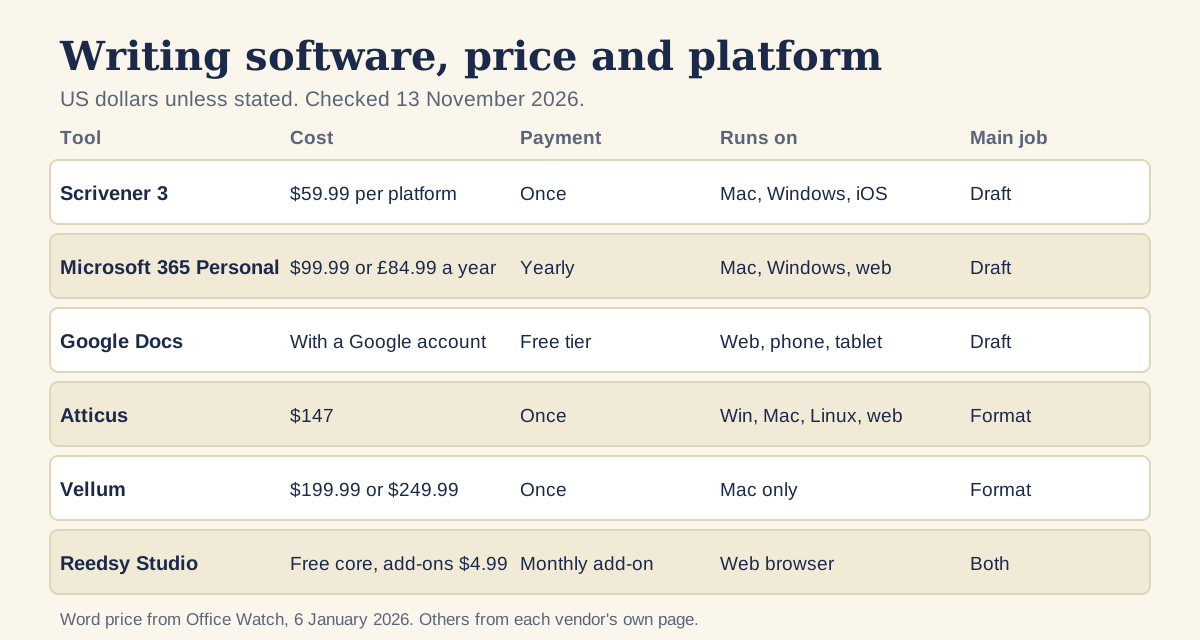
Literature & Latte's cross-grading page lists Scrivener for macOS or Windows at $59.99, and its licensing page says the licence is a one-off purchase with no subscription. You can keep using the version you bought for as long as your operating system supports it. The company's store page lists the iOS and iPadOS app separately at US$23.99, and the store page did not show the macOS and Windows figures in the text we could read, so the $59.99 comes from the cross-grading page.
Each licence covers one operating system. If you write on a Mac at home and a Windows laptop on trips, you need both, and the cross-grading page says that owning one lets you buy the other for $37.95. The two together cost $97.94 by our addition. The licensing page also says a licence is a household licence, valid on every computer you own that runs the licensed operating system, used only by you and family members who live with you.
The same page says free updates continue within a version, such as 3.1 and 3.2, but a new major version, for example Scrivener 4, needs a new licence at a discount. Upgrading is optional. The current versions on the download page are 3.5.2 for macOS (macOS 11 or later), 3.1.6 for Windows (64-bit Windows 10 or later) and 1.2.4 for iOS (iOS 11 or later).
What does the free trial give you?
The download page says the trial is the full version and stops working after 30 days of use. Use it every day and it lasts 30 days. Use it two days a week and it lasts about fifteen weeks. There is no trial of the iOS app, because the page says the company cannot offer one at present.
Spend the trial on one real chapter, not on the sample project alone. Import a finished chapter, split it into scenes, compile it to EPUB and to PDF, and read both. If the structure helps and the compile settings make sense, buy it. If you find yourself exporting everything to Word anyway, you have your answer for $0.
What Scrivener does well
Literature & Latte's overview page describes a manuscript that you can organise in any order and in sections of any size. In practice that means three things for an indie author.
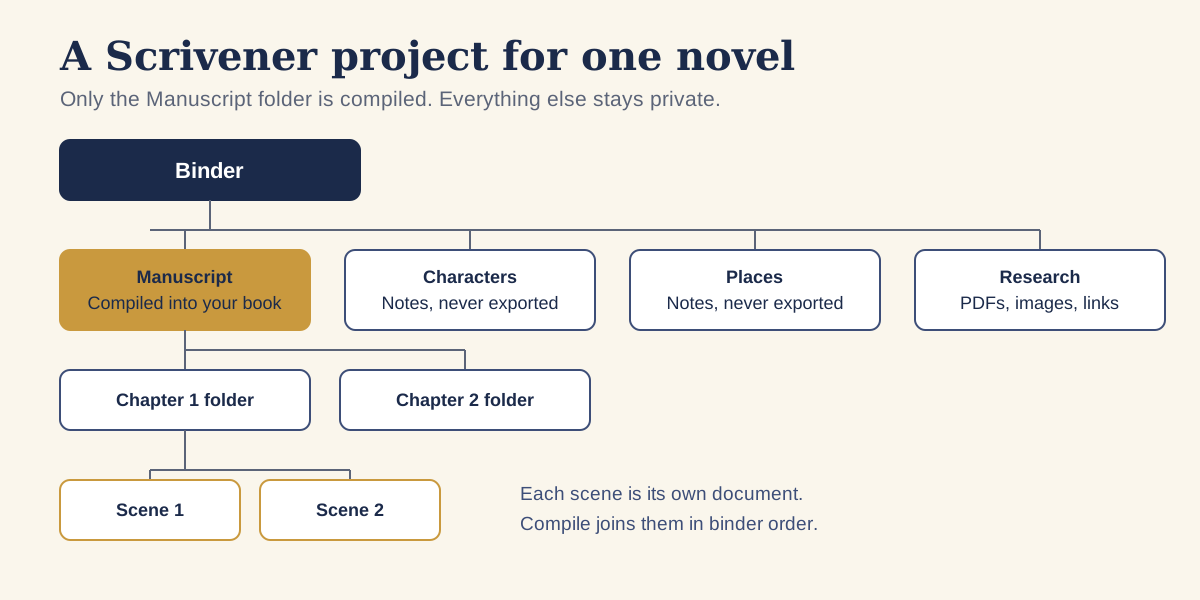
- Scenes are separate documents inside folders, so moving a chapter is a drag in the sidebar rather than a cut and paste through 80,000 words.
- A corkboard, an outliner and a Scrivenings mode that shows several sections as one continuous document, so you can plan in cards and still read the text as a whole.
- Research storage: the page lists PDFs, web pages and images imported into the project, with up to four documents viewable side by side on desktop.
- Snapshots with a Compare feature, auto-save and automatic backups, plus word and character targets and a writing history.
None of these tools writes the book for you. They reduce the friction of a long manuscript, which is why long and complex projects benefit most.
Where authors find Scrivener hard
The official Scrivener 3 manual calls itself a reference rather than a training tool, and recommends the Interactive Tutorial in the Help menu as the best way to start. That tells you what to expect: there is a lot to the program, and you learn it by working through the tutorial project, not by opening a blank document and guessing.
The harder part is Compile. Literature & Latte's compile guide describes the Compile screen as three columns, Formats, Section Layouts and Compile Options, and warns that section layouts override the formatting you applied while writing, so the exported file can look different from your working draft. That is a feature once you understand it, and a source of confusion until you do. The company offers a video series on compiling, from a quick start to creating a custom format.
Scrivener's overview page says you can create EPUB and Kindle ebooks to sell on Amazon or elsewhere, and print using formatting tailored to submission guidelines. Whether the result looks as designed as a dedicated formatter's output is a judgement for your own eyes. Compile a sample and compare it with a published book in your genre.
How to get started in four steps
- Start the 30-day trial and work through the Interactive Tutorial from the Help menu. It builds a sample project that you read and change as it instructs.
- Create a blank novel project and keep the structure plain: a Manuscript folder, one folder per chapter and one document per scene, with Characters, Places and Research folders outside the Manuscript.
- Set a word target for the project and write in Scrivenings mode so a chapter reads as one piece.
- Compile a short sample early, to EPUB and to PDF, and look at it before you have 90,000 words riding on the settings.
Take a snapshot before any big rewrite. Snapshots store a version of a document that you can compare with the current text, so a rewrite never costs you the original.
What do the alternatives cost and do?
Prices below are as of 13 November 2026 and come from each vendor's own page unless we say otherwise.
- Microsoft Word. Microsoft's own page did not load for us. Office Watch reported on 6 January 2026 that Microsoft 365 Personal costs $99.99 a year in the US and £84.99 in the UK. Check Microsoft's page for today's price.
- Google Docs. Google says anyone with a Google account can create in Docs, and that you can import Word and PDF files. It lists no export formats on that page.
- Atticus. Atticus costs $147 once, with updates included, and runs on Windows, Mac, Linux and Chromebook. It writes and formats: it imports DOCX and exports EPUB, PDF and DOCX. It offers a 30-day money-back guarantee, and we saw no free trial mentioned.
- Vellum. Vellum is Mac only and needs macOS 14 or newer. Vellum Ebooks is $199.99 and Vellum Press, which adds paperbacks, is $249.99, before tax. It is a formatter, so you write elsewhere.
- Reedsy Studio. Reedsy says its core writing and formatting features are free with a Reedsy account, with one-click EPUB and print-ready PDF export. Paid add-ons start at $4.99 a month, and it runs in a browser.
- Ulysses. Ulysses costs $39.99 a year or $5.99 a month in the US, and runs on Mac, iPad and iPhone.
Amazon's own Kindle Create turns a finished DOC or DOCX file into a Kindle book, with KPF as the recommended export. KDP's page lists no price, so check the download page.
What does each route cost over three years?
A worked example, using the prices above and nothing else. Subscriptions are multiplied by three, and one-off licences are counted once.
| Route | Cost over 3 years |
|---|---|
| Scrivener alone (one platform) | $59.99 |
| Scrivener on Mac and Windows | $97.94 |
| Scrivener plus Atticus | $206.99 |
| Scrivener plus Vellum Ebooks (Mac) | $259.98 |
| Ulysses at the yearly price | $119.97 |
| Microsoft 365 Personal at $99.99 a year | $299.97 |
These are software costs only. Our guide to what it costs to self-publish a book covers editing, covers and the rest, and what the do-it-yourself author stack costs a year adds up the website, list and design tools.
How do you export from Scrivener to a formatting tool?
The common route is to compile to DOCX and import that file into the formatter. Literature & Latte's compile guide says editable formats such as .docx let you change the compiled document, and Atticus lists DOCX import while Kindle Create takes DOC and DOCX. Vellum's page does not list its import formats, so check its documentation before you rely on this route.
- Finish the draft and take a snapshot of every chapter.
- Choose File, then Compile, and select DOCX as the format.
- Pick a plain section layout. Fancy fonts and headers belong in the formatter, not in the DOCX.
- Open the DOCX in Word or Google Docs and check that chapter titles are real headings.
- Import it into your formatter and preview the result on a device or in Kindle Previewer.
Our article on book formatting software and common mistakes covers what to check in the finished files, and the steps to self-publishing in order shows where formatting sits in the whole process. For the wider tool list by job, see the software indie authors use.
A one-week trial plan that tests the right things
Because the trial counts days of use, a week of short sessions uses only a week of it. This plan gets a clear answer from about seven sessions.
- Session 1: work through the Interactive Tutorial until you have used the corkboard, the outliner and Scrivenings mode.
- Session 2: import one finished chapter and split it into scenes.
- Session 3: reorder three scenes by dragging, then undo it with a snapshot comparison.
- Session 4: write 500 new words with a session target and see whether the interface helps or distracts you.
- Session 5: compile to EPUB and open the file in an e-reader or previewer.
- Session 6: compile to PDF at your paperback trim size and read two pages against a printed book.
- Session 7: decide, and write down the one task that was easier and the one that was harder.
If the easier list is longer, buy it. If the harder list is longer, a simpler tool will serve you better, and nothing has been spent.
So is Scrivener worth it for you?
Buy Scrivener if your trial chapter went better than it would have in a single document, and if you are willing to spend an evening on Compile. Skip it if your book is short and linear, or if your main need is a polished interior, in which case a formatter is the better first purchase. If you want to avoid any spend, write in Word or Google Docs and format in Reedsy Studio, then upgrade only when a real problem appears.
Questions, answered
Is Scrivener a one-off payment or a subscription?
As of 13 November 2026, Literature & Latte's licensing page describes Scrivener licences as one-off purchases with no subscription. A new major version, such as a future Scrivener 4, would need a new licence at a discount.
How much does Scrivener cost?
Literature & Latte's cross-grading page lists Scrivener for macOS or Windows at $59.99, with the other platform available at $37.95 if you own one. The iOS app is listed separately at US$23.99 on the store page.
How long is the Scrivener free trial?
The trial is the full version and lasts 30 days of use, not 30 calendar days, according to the download page. There is no trial for the iOS app.
Can Scrivener publish straight to Kindle?
Scrivener's overview says you can create EPUB and Kindle ebooks to sell on Amazon or elsewhere. Check the compiled file in a previewer before you upload it, and consider a formatting tool if you want a more designed layout.
Is Scrivener better than Word for a novel?
For long books with many scenes it can be easier to restructure, because each scene is its own document. For a short, linear manuscript, Word does the job and you may already own it.
Run it all from one place
Author page, direct sales, reader list, review copies and press kit, built from one ASIN. Free for 14 days, no card.
Start your free trial