
Indie Author Academy / Resources
Best software for indie authors: the stack by job
The best software for indie authors by job, with what each free tier covers, what to pay for first, and what publishers use. Prices checked November 2026.
The best software for indie authors is a short list, not a stack of subscriptions. You can write, format, design and email readers for $0 on free tiers, and most authors should start there. The tools worth paying for first are a formatter if the free output looks plain, then an email service once your list passes 250 subscribers. All prices here are as of 13 November 2026 and come from each vendor's own page unless we say otherwise.
This article is organised by job, with a free starting point and a paid step for each. It adds to, and does not repeat, our guides to what the do-it-yourself author stack costs a year and mailing list tools compared, which cover the website, email and direct-sales bills in detail.
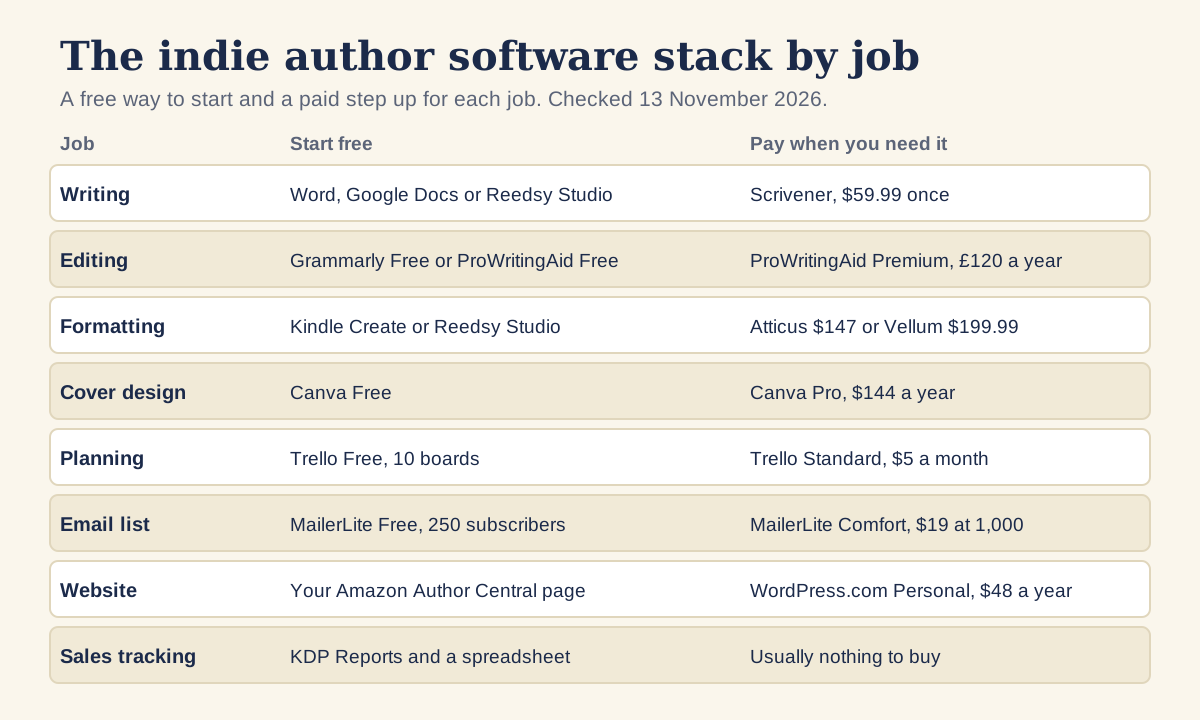
Writing software: what do you need to draft a book?
A word processor you already own is enough for a first draft. Google says anyone with a Google account can create in Google Docs, and it can import Word files. Reedsy says its Studio writing and formatting features are free with an account, with one-click EPUB export and print-ready PDF export, and paid add-ons from $4.99 a month. It runs in a browser.
Scrivener is the paid option for long or research-heavy books. As of 13 November 2026 it is a one-off $59.99 per platform according to Literature & Latte's cross-grading page, with a 30-day free trial. Our verdict by author type is in is Scrivener worth it for authors.
Editing software: Grammarly and ProWritingAid
Editing software checks language. It does not replace a human editor, and our guide to what it costs to self-publish covers where editing money goes. When we read the Grammarly plans page, it showed prices in pounds: the Free plan includes spelling and grammar corrections, tone feedback and 100 AI text-generation prompts a month, and Pro was £10 a month. We saw no annual Pro price on that page.
The ProWritingAid pricing page also showed pounds. Its Free plan runs line-editing suggestions on 500 words at a time, with 2 runs per report a day. Premium is £30 a month, or £10 a month billed as £120 a year, with a £399 lifetime option, and removes the 500-word limit. The yearly and lifetime plans carry a 3-day money-back guarantee and the monthly plan has no refunds. It works in Word and Google Docs through integrations.
The 500-word limit matters for a novel: free mode suits checking a chapter opening, not a whole manuscript. Check the free plan on your own prose before you pay, and keep a human proofreader for the final file.
Grammarly or ProWritingAid for a manuscript?
The pricing pages point to different uses. Grammarly's free plan checks spelling, grammar and tone as you write, and its page says full-sentence rewrites, plagiarism detection and AI detection need Pro. ProWritingAid's free plan runs line-editing suggestions but caps each run at 500 words, and its Premium plan removes that cap and adds unlimited runs and rephrases.
For a long manuscript, the limit decides it. Grammarly's free plan has no word cap on the page we read, so it can check a full chapter at no cost. ProWritingAid's free plan checks 500 words at a time, so you would paste your chapter in pieces or pay for Premium. Neither page says how well either tool handles dialogue or voice in fiction, so run each on one of your own scenes and keep only the suggestions you would have made yourself.
Whichever you try, turn it off for your final read. Software suggestions flatten dialogue and regional speech, and a human proofreader catches what both tools miss.
Formatting software for ebook and paperback
Amazon's Kindle Create turns a DOC or DOCX file into a Kindle book, and its help page lists KPF as the recommended export for ebooks and print books on KDP. That page lists no price. Atticus costs $147 once, with updates included, on Windows, Mac, Linux and Chromebook. Vellum is Mac only, and its own page lists Vellum Ebooks at $199.99 and Vellum Press, with paperbacks, at $249.99.
Start with the free output and look at it next to a published book in your genre. If it reads as plain, a paid formatter is the first purchase worth making. Our guide to book formatting software and the mistakes to avoid covers what to check in the finished file.
Cover design: Canva and its limits
Canva showed Free at $0 and Pro at $144 a year for one person when we checked, in US dollars and before tax. Free includes the drag-and-drop editor, more than 1.6 million templates and one brand kit of three colours. Pro suits the ads, banners and social graphics you make around a launch.
A book cover has to work at thumbnail size and signal its genre, which is a design brief problem more than a software one. Our article on the book cover design brief and what covers cost covers when to hire a designer and what to put in the brief. Canva Free is enough for the graphics either way.
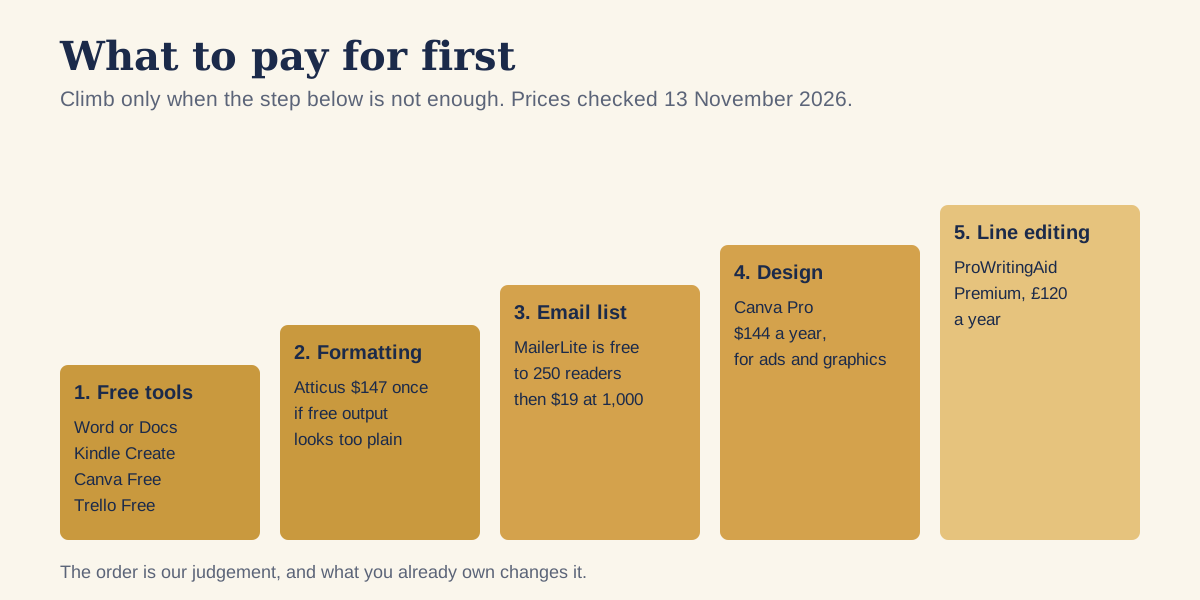
Best software for indie authors: what to pay for first
The order is our judgement, based on where a free tier runs out first. It is not a ranking from any vendor, and your situation may reverse it.
- Nothing, at first. Word or Docs, Kindle Create or Reedsy Studio, Canva Free and Trello Free cover a first book.
- A formatter, if the free output looks plain next to your genre. Atticus is $147 once.
- An email service, when the list passes the free limit. Our mailing list comparison, checked on 1 November 2026, has MailerLite free to 250 subscribers and $19 a month at 1,000, with Kit free to 10,000 but without automations.
- Canva Pro, if you make ads and graphics weekly. It is $144 a year.
- Line-editing software, when a human editor is already booked and you want a second pass. ProWritingAid Premium is £120 on yearly billing.
Add those five at the paid prices above and you reach $147 plus $228 for a year of MailerLite Comfort at $19 a month, plus $144, plus £120. That is $519 plus £120, before a website. It is an illustration of the ceiling, not a target. Most authors need only the first two or three steps in year one.
A worked example: three first-year budgets
These three budgets use only the prices quoted above, with arithmetic by us. They show how fast the total grows, not what any author should spend. Currencies are kept as the vendors show them, so we have not converted pounds to dollars.
| Budget | Tools | First-year cost |
|---|---|---|
| Free route | Word or Docs, Kindle Create, Canva Free, Trello Free, MailerLite Free | $0 |
| One paid step | The free route plus Atticus | $147 |
| Fuller route | Atticus, MailerLite Comfort at $19 a month for 12 months, Canva Pro | $519 |
| Fuller route plus editing software | The fuller route plus ProWritingAid Premium | $519 plus £120 |
The MailerLite line assumes a list of 1,000 subscribers all year, which is optimistic for a first-time author. A list under 250 stays on the free plan, and the fuller route then costs $291 by our addition. Each author's list grows at its own pace, so treat the gap between the two figures as the cost of waiting until you need the paid plan.
Five checks before you buy any author tool
- Name the job it does. If you cannot say which task it removes from your week, wait.
- Find the free limit on the vendor's pricing page and test it on your own manuscript.
- Read the refund terms. ProWritingAid's page lists a 3-day money-back guarantee on yearly and lifetime plans and none on monthly, while Atticus lists 30 days.
- Check your operating system. Vellum needs a Mac, and Scrivener needs a separate licence for each platform.
- Look for lock-in. Prefer tools that export a standard file such as DOCX, EPUB or PDF, so you can move later without retyping.
Project management and launch planning
A launch needs a task list with dates, and a board does that better than a notes file. Trello lists its Free plan at up to 10 boards per workspace and up to 10 collaborators, with a 10MB limit per file. Standard is $5 per user a month billed annually, or $6 billed monthly. One board with columns for To do, This week and Done is enough.
Copy the dates from our 12-week launch timeline and the book launch checklist into cards instead of designing your own plan from scratch. A spreadsheet or a notes app does the same job at no cost.
Email list and author website
Email is the one tool where waiting costs you, because readers you do not collect cannot be emailed later. The free tiers differ: MailerLite stops at 250 subscribers and Kit at 10,000, according to our 1 November 2026 comparison. The full table is in our MailerLite, Kit and Mailchimp comparison.
For a website, our checks on 1 November 2026 found Squarespace Basic at $25 a month ($19 billed yearly) and WordPress.com Personal at $4 a month billed annually, which is $48 a year. The six pages worth building lists what goes on it. The Indie Author Toolchest bundles an author page, a reader list and direct sales for $12.99 a month or $120 a year, as one option if you want those jobs in one place.
Sales tracking
Your first sales tracker is KDP itself. The KDP Reports help page describes a dashboard of estimated royalties, orders and Kindle Edition Normalized Pages read, and KDP's help says estimated royalties can take 24 to 48 hours to update. Paid royalties appear in the payments report later. Add a spreadsheet for spend per book, then compare spend with royalties as set out in our guide to tracking book sales and return on investment.
You do not need a paid tracker for one book. If you publish on several stores, a monthly spreadsheet row per store is enough to start.
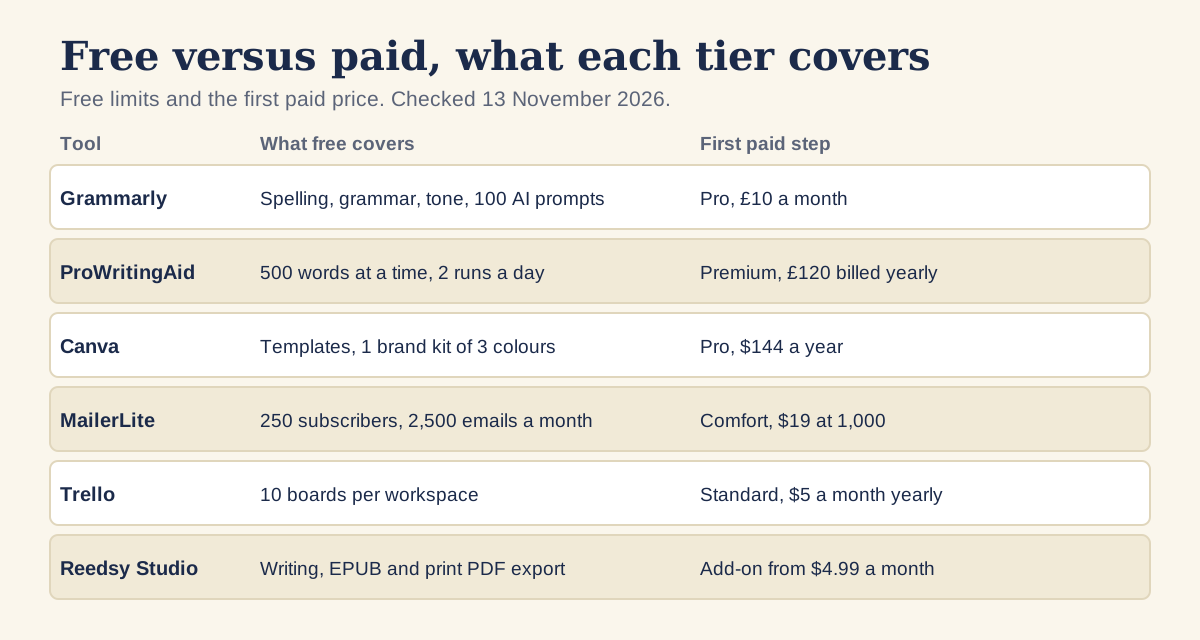
What does the free tier cover, and when is paid worth it?
Free tiers are built to be useful and to run out. The limits above are the useful signal: 500 words for ProWritingAid, 250 subscribers for MailerLite, 10 boards for Trello, a 3-colour brand kit for Canva. Pay when you hit the limit on a job that matters to a launch, not before.
- Pay when a free limit blocks a real task, such as a list past 250.
- Pay annually only for a tool you used in each of the last three months.
- Write renewal dates in a calendar, because every price here is billed in advance.
What do traditional publishers use that you can copy?
We looked for tool claims we could source to a named page, and found one. Adobe says on its InDesign page that the program is built for groups including book publishers, and lists it at US$22.99 a month for the single app on the annual plan billed monthly. Indie authors can buy the same program. Whether it beats Atticus or Vellum depends on how much layout control you want and how much time you will spend learning it.
We found no other publisher-tool claim with a named source, so we have left the rest out. If a guide tells you that publishers use a particular program, ask where it got that.
Where to find more
Our resources for self-published authors page lists the organisations, help centres and standards bodies worth bookmarking, and our guide to the steps to self-publishing in order shows where each tool fits in the process.
Questions, answered
What is the best software for indie authors on a budget?
Start with Word or Google Docs, Kindle Create or Reedsy Studio, Canva Free and MailerLite's free plan, as of 13 November 2026. That covers writing, formatting, design and email at no cost, within the free limits.
Do I need ProWritingAid or Grammarly to self-publish?
No. Both check language and neither replaces a human editor. Their free plans are limited, with ProWritingAid's capped at 500 words at a time, so test them on a chapter before paying.
Is Atticus or Vellum better for formatting?
Atticus is $147 once and runs on Windows, Mac, Linux and Chromebook. Vellum is Mac only and costs $199.99 for ebooks or $249.99 with paperbacks. Check a sample from each against a book in your genre.
What software do traditional publishers use?
The only claim we could source is Adobe's own, which says InDesign is built for groups including book publishers. It costs US$22.99 a month on Adobe's annual plan billed monthly, and indie authors can buy it too.
What should I buy first as a new author?
A formatter if the free output looks plain, then an email service once your list passes 250. That order is our judgement, so move the steps if a different limit blocks you sooner.
Run it all from one place
Author page, direct sales, reader list, review copies and press kit, built from one ASIN. Free for 14 days, no card.
Start your free trial